Project tracking that lives where your customers do.
Boards, Gantt charts, dependencies, cycles, templates, and time tracking — attached to the same customer record as the deal that won the work. Won deals spin up their delivery project; blocked work surfaces before the deadline does.
No credit card needed
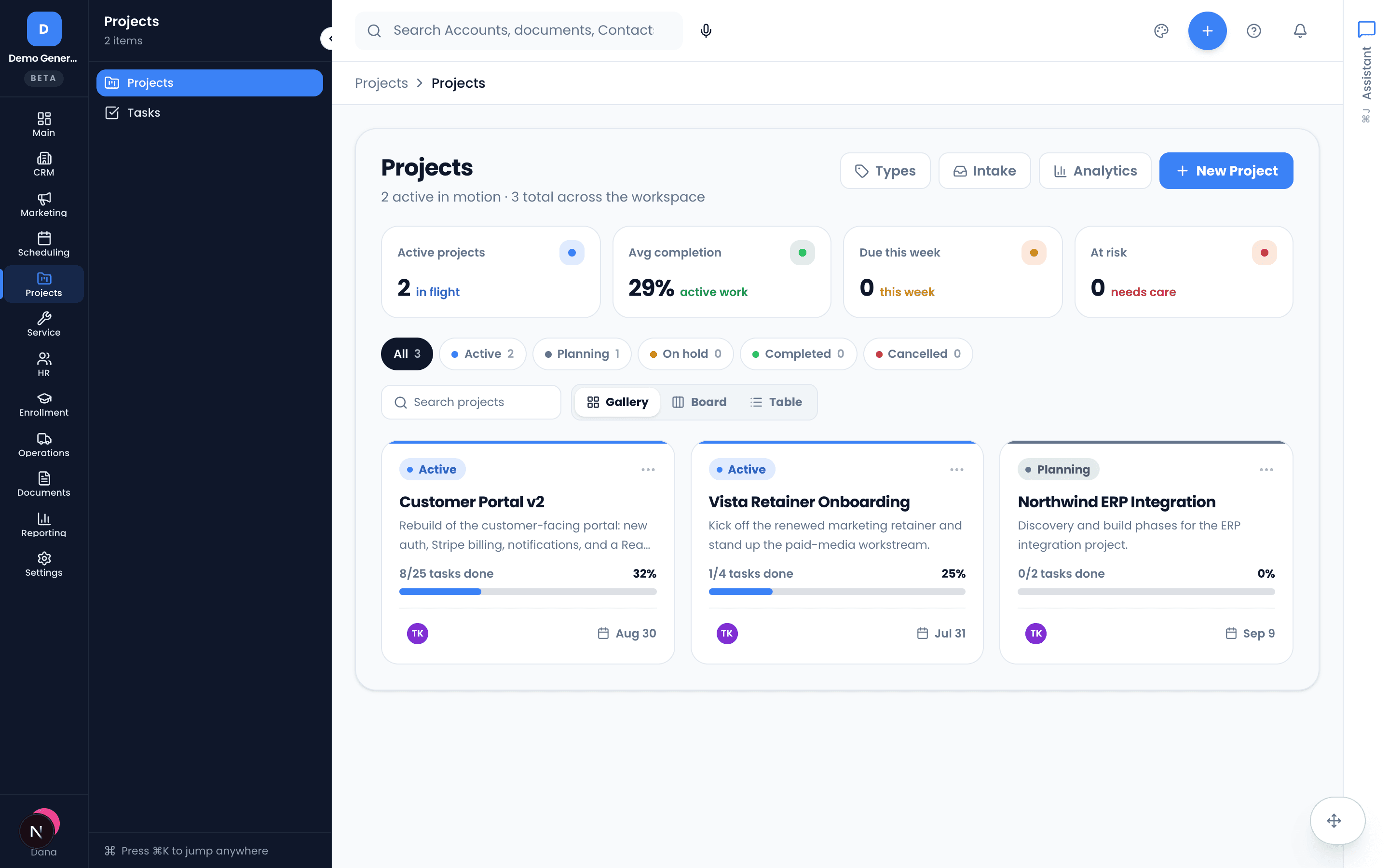
A portfolio you can read at a glance
Every body of work is a project with a start, an end, and its tasks. The portfolio view shows active projects, average completion, what’s due this week, and what’s at risk — and each project card carries its percent complete and an At-risk or Due-soon chip when it earns one.
- Gallery, Board, and Table views over the whole portfolio
- Project statuses that match reality: Planning, Active, On hold, Completed, Cancelled
- Projects spun up from a won opportunity link back to the deal
- Per-project workspace with Board, List, Calendar, and Gantt task views plus files
Four levels, so nothing hides inside a vague to-do
Project → task → subtask → checklist item. Subtasks are full tasks with their own owner, priority, and due date; checklist items are lightweight tick-boxes — and when one grows into real work, promote it to a subtask in place.
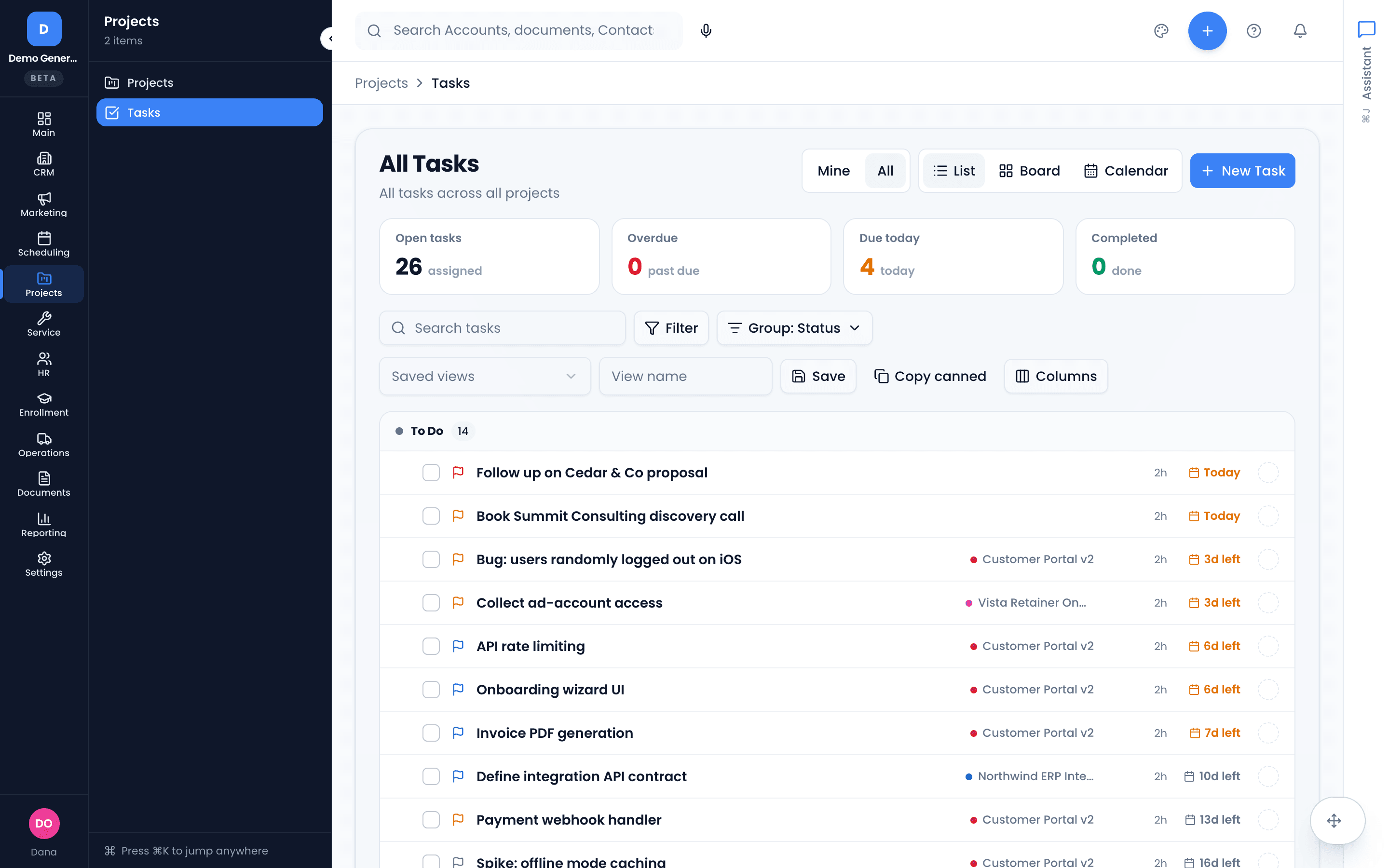
- Task priorities Low → Urgent, color-coded on every card
- My Tasks / All Tasks scope with grouping by status, project, priority, or due date
- Watch any task to be notified of changes
- Stat cards count open, overdue, due-today, and completed at all times
Sequencing that actually blocks
Hard dependencies with real scheduling semantics — finish-to-start, start-to-start, finish-to-finish, start-to-finish — plus softer related-task links. The task page groups what this task blocks and what blocks it, so the critical path is visible where the work happens.
Dependencies and related links are scoped within a single project.
- All four dependency types (FS, SS, FF, SF)
- “This task blocks…” and “blocked by…” grouped on the task page
- Related-to and duplicate-of links for softer connections
- Blocked work feeds Vertiqa’s follow-up tracking — overdue predecessors surface in the Command Center
Repeatable delivery, not reinvented delivery
Time-box work into cycles — sprints, weeks, delivery windows — with a burndown chart that shows whether the window will hold. Start every engagement from a project template that creates the project and fills in its default tasks in one step.
Templates create projects and tasks — subtasks and checklist items are added after.
- Cycles with Upcoming, Active, and Completed states and per-cycle goals
- Burndown of assigned tasks against the cycle window
- Templates with relative due dates (“due 7 days after project start”)
- Modules group board sections with a lead, a date window, and a progress rollup
Know what the work actually cost
Log time on any task with a running timer or a quick entry — “90m”, “1.5h”, “1h 30m” all parse. Each worklog carries an optional note and a billable flag, tracked against the task’s estimate with an over-budget warning you can’t miss.
- Start/stop timer or type a duration — stored to the minute
- Billable flag on by default; non-billable entries badged
- Logged-vs-estimate progress bar, green under budget, red over
Project and portfolio truth, read-only by design
Per-project KPIs — open tasks, completion, overdue, 30-day throughput, time logged vs estimate, active assignees — and a portfolio dashboard with completion by project and a Projects-by-risk table you can drill into. Looking never changes the data.
- Throughput, overdue, and completion tiles per project
- Tasks by status, by priority, and open tasks by assignee
- Portfolio-level Projects-by-risk table with drill-in
 Asana
Asana Trello
 ClickUpFor customer-delivery project tracking. Not a git-connected engineering tracker — devs who live in Linear can sync via the API.
Asked plainly
Is this a real project tool or CRM tasks with a new name?
Real project tracking: projects with Board, List, Calendar, and Gantt views, a four-level work hierarchy (project → task → subtask → checklist item), FS/SS/FF/SF dependencies, time-boxed cycles with burndown charts, templates, time tracking, and read-only project and portfolio analytics. What it is not: a git-connected engineering tracker — there are no pull requests or sprint ceremonies, and developers who live in Linear can sync via the API.
Does it connect to my deals?
Yes — marking an opportunity as Won can spin up the delivery project automatically, and the project shows a banner linking back to the deal it came from. Meetings and documents link to projects too, so the sale and the delivery share one customer thread.
Can I standardize how projects start?
Project templates save the shape of a project plus its default tasks — each with optional relative due dates like “7 days after project start” — so applying a template creates the project and fills in every task in one step. Honest limit: templates create projects and tasks, not subtasks or checklist items.
How do I know a project is in trouble before it’s late?
Three ways. Project cards carry At-risk and Due-soon chips; the portfolio analytics dashboard has a Projects-by-risk table you can drill into; and Vertiqa’s follow-up tracking watches for blocked work — an overdue predecessor task in front of a deadline lands in your Command Center with the evidence attached.
Dig into the details
Every claim on this page is documented in the help center.
Related: CRM · Follow-Up Tracking · Quoting & Invoicing
The deal and the delivery, on one record.
Thirty days, every tool, no credit card. Win the deal, spin up the project, and keep the promise.
Every tool included. No credit card needed.