From quote to paid — one linked chain.
Estimates that track the customer’s decision, invoices that track the payment, and a conversion between them that carries every line item over — all linked to the deal, so reporting sees opportunity → estimate → invoice → payment as one story.
No credit card needed
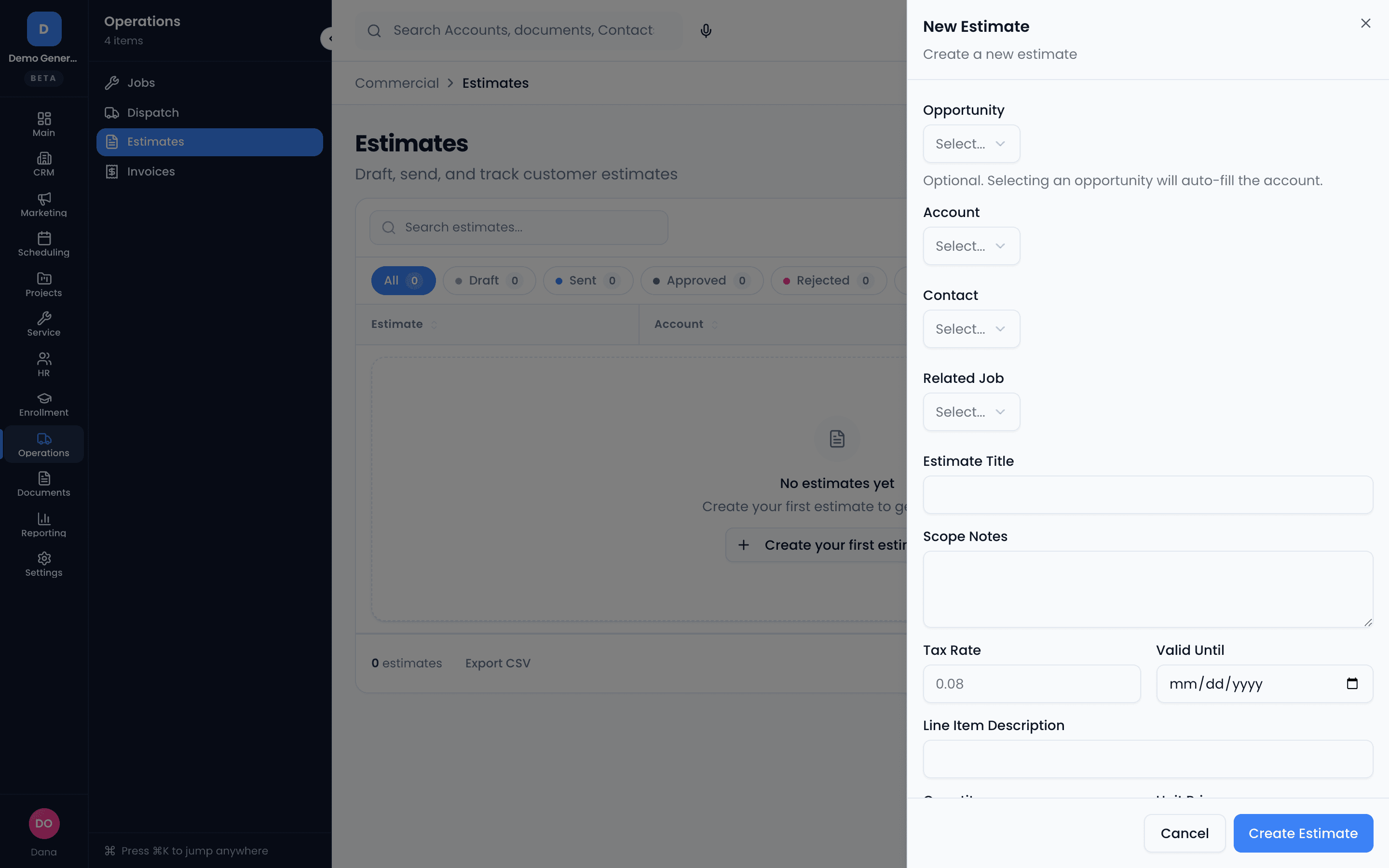
Quotes that track the decision, not just the number
Build an estimate with line items, tax, and a valid-until date; link it to an opportunity to auto-fill the account, or keep it standalone. Statuses follow the customer’s decision — Draft, Sent, Approved, Rejected, Expired — and the estimate’s status can move the linked deal’s stage.
- Line items with quantity, unit price, and per-line totals
- Valid-until dates so stale quotes expire instead of lingering
- Search and filter by status, contact, account, opportunity, or date range
- Estimate progress reflected on the linked opportunity
Humans approve. Records lock. Disputes resolve.
Approval is human-only — an AI agent can draft and recommend, but never approve. Discounts past your threshold are held for a manager. And once approved, an estimate locks: changes become a revision with the original kept on record.
- Human-only approval, by design — no agent can approve a quote
- Approval thresholds route deep discounts to a manager
- Approved estimates lock; revisions preserve the original
- The audit trail is the point: it’s what makes disputes resolvable
Invoices that know their balance
Send, track, and reconcile with statuses that follow the money: Draft, Sent, Partial, Paid, Overdue, Void. Every invoice page shows the balance due, payment history, and the records it belongs to — contact, account, job, and the estimate that started it.
- Partial payments tracked until the balance hits zero
- Download PDF; sending notifies the contact
- Void — never delete — sent invoices; voided stays on record, out of revenue
- Separate permission gates for sending, voiding, and editing
One click from agreed to billed
When the work is delivered, convert the approved estimate: line items carry over, records link up, and the full chain — opportunity, estimate, invoice, payment — stays connected for reporting. Scope changed mid-flight? Revise the estimate or void-and-reissue the invoice; never rewrite history.
- Line items carry over on conversion — nothing retyped
- Deal, quote, invoice, and payment linked end to end
- Revision and void-and-reissue flows instead of in-place edits
For teams that buy as well as sell
Draft a structured RFQ straight from an inbound inquiry — contact, items, and quantities parsed from the message — edit with auto-save, and export a letterhead PDF. The footer carries the RFQ ID, so supplier responses match back to the right record.
Formal RFQs ship with the systems-integrator pack — if your vertical needs them, say so on a fit call.
- Pre-filled from the inquiry; the original ask stays attached
- Line items, response-by date, delivery target, supplier instructions
- Server-rendered PDF with your letterhead; internal notes never exported
- RFQ activity (sent, viewed, responded) on the inquiry timeline
Asked plainly
What’s the difference between an estimate and an invoice here?
An estimate is a promise to charge — its lifecycle is the customer’s decision (Draft, Sent, Approved, Rejected, Expired) and it carries a valid-until date. An invoice is a demand for payment — its lifecycle is the payment (Draft, Sent, Partial, Paid, Overdue, Void). Converting an approved estimate carries the line items over and links the records, so reporting sees the whole chain: opportunity → estimate → invoice → payment.
Can an AI agent approve a quote or a discount?
No — deliberately. Approval is human-only: an agent can draft or recommend, but a person approves. Discounts beyond your approval threshold are held for a manager. And once approved, an estimate locks — changes become a revision with the original kept on record, which is exactly what makes disputes resolvable later.
What happens when the scope changes after I’ve sent something?
You don’t edit history. For estimates, send a revision — the original stays on record. For invoices, void and re-issue rather than editing in place; voided invoices remain visible for audit and don’t count toward revenue. Partial payments track automatically until the balance hits zero.
What are formal RFQs?
For teams that buy as well as sell (it ships with the systems-integrator pack): create a structured request-for-quote directly from an inbound inquiry — contact, requested items, and quantities pre-filled from the message — edit it with auto-save, and export a letterhead PDF whose footer carries the RFQ ID, so supplier responses match back to the right record automatically.
Dig into the details
Every claim on this page is documented in the help center.
Related: CRM · Projects & Tasks · Follow-Up Tracking
Quote it, win it, bill it — without retyping any of it.
Thirty days, every tool, no credit card. Your next quote can live on the same record as the deal it closes.
Every tool included. No credit card needed.