Scheduling that books itself — straight into your CRM.
Share a link, let the customer pick a time from your real availability, and the meeting lands on your calendar and on their CRM record — confirmations, reschedules, and cancellations handled without a single “what time works for you?” email.
No credit card needed
Kill the back-and-forth thread
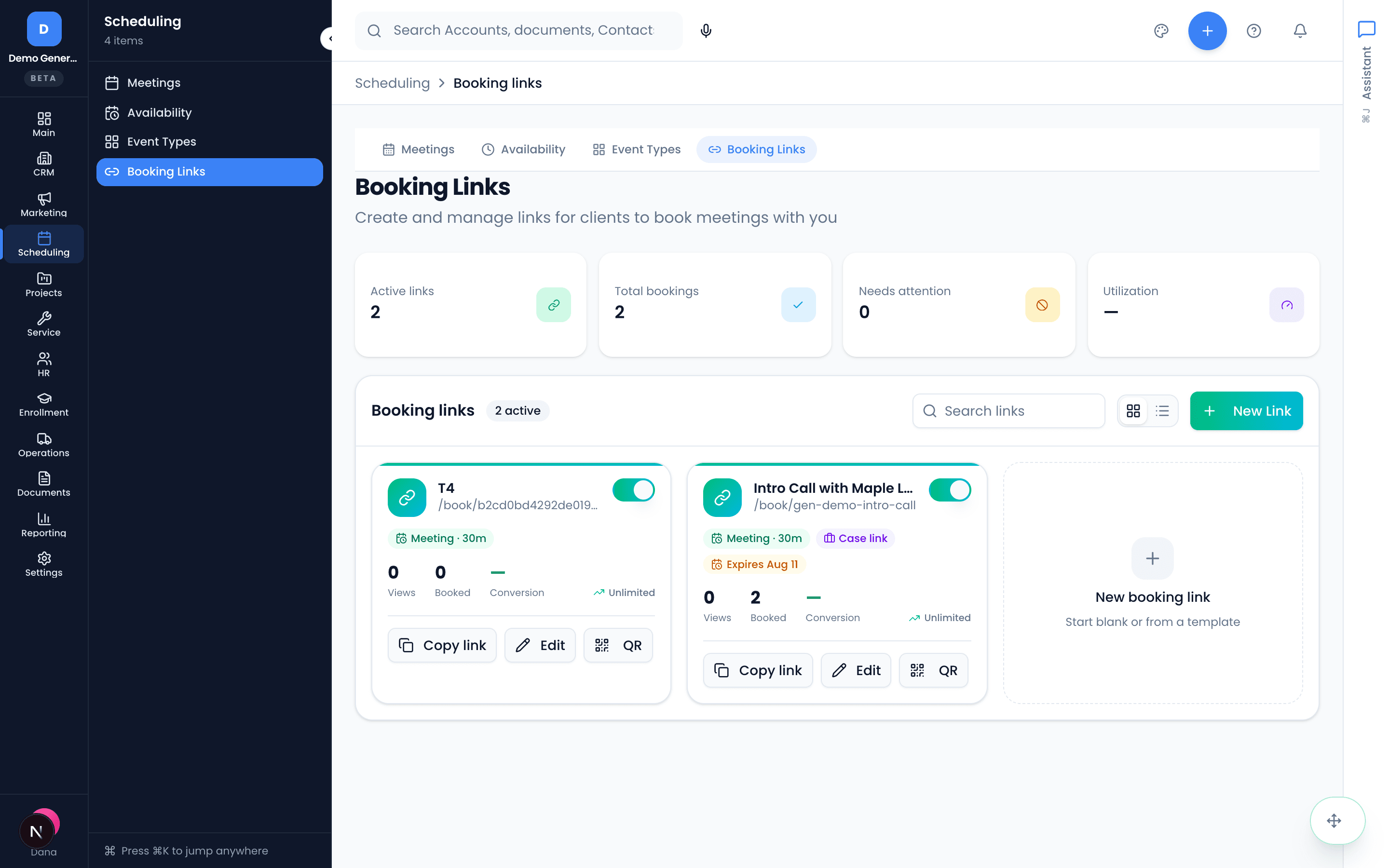
A booking link is a public page where prospects and customers pick a time without the email volley. Each link is backed by an event type that controls duration, buffers, and location — and every booking lands on your meetings list automatically.
- Create a link with a name, event type, optional expiration, and an optional booking cap (“first 5, then auto-close”)
- One-click copy, or generate a tracked QR code for print and field use
- Revoke a link anytime — existing bookings stay, new ones stop
- Each card shows status, event type, and bookings-used-vs-cap at a glance
Your hours, your rules — enforced everywhere
Set weekly availability rules per day (with multiple ranges like 9–12 and 1–5), your timezone, meeting durations from 15 minutes to 2 hours, and pre/post-meeting buffers. Event types are reusable templates — discovery call, renewal review, site visit — so links always offer the right shape of meeting.
- Days without rules are simply unavailable; existing meetings block their slots automatically
- Buffers before and after every meeting, so back-to-backs stop happening
- Location per event type: call, video, or in-person
- One master toggle closes every booking link instantly when you’re out
Confirmed, invited, reminded — without you
The moment someone books, both sides get a confirmation email with a calendar invite attached, and you get a “New booking” notice. The invitee manages their own booking from their email — reschedules pick from your real availability, and everything updates itself on both calendars and in Vertiqa.
- Confirmation emails with .ics calendar invites to both parties, automatically
- Self-serve reschedule and cancel links for the invitee
- Updated emails and refreshed invites on every change
- The meeting record in Vertiqa tracks it all without manual edits
One calendar truth — no double-booking
Connect Google Calendar and Zoho Calendar (multiple accounts, mixed providers). Connected calendars feed busy slots into your availability, and you choose the one calendar new bookings write to. If a connection breaks, Vertiqa tells you and walks you through reconnecting.
Google and Zoho calendars today — Outlook/Microsoft 365 is on the roadmap. Round-robin team routing and auto-generated video links aren’t there yet either.
- Per-calendar conflict checking; the write-target calendar is always checked
- Pick exactly one write-target — or keep bookings in Vertiqa only
- Privacy built in: teammates see “Busy”, never your event titles
- Sync status, last sync, and busy-slot counts visible per connection
Meetings that belong to the relationship
Every meeting — booked or created directly — lives on a meetings list you can view as list or calendar, and can link to the account, contact, opportunity, project, or task it’s about. So the site visit shows up on the deal, not just on a calendar square.
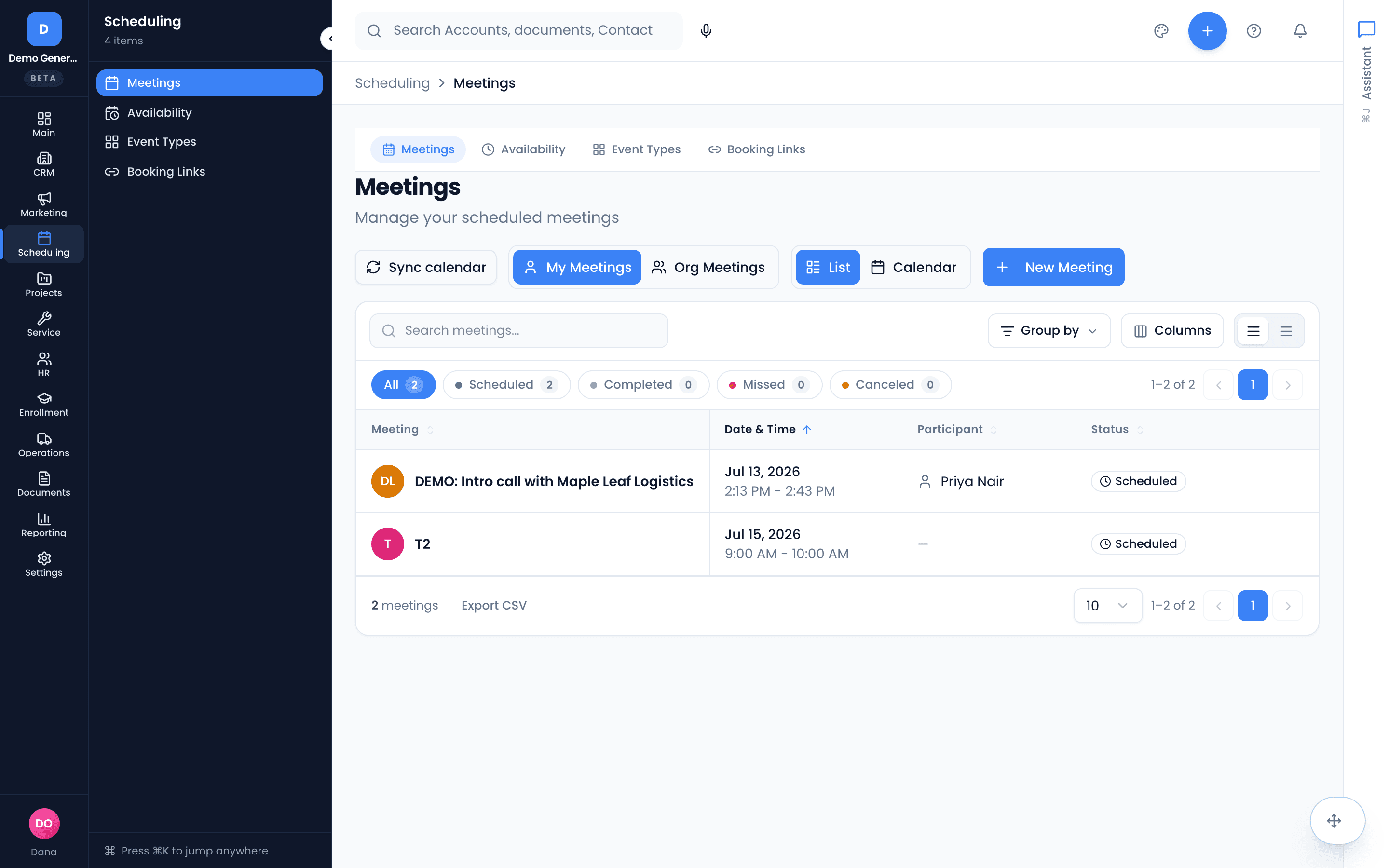
- List and day/week/month calendar views with status filters
- Statuses that match reality: Scheduled, Completed, Missed, Canceled
- Link any meeting to an account, contact, opportunity, project, or task
- Imported external events appear read-only and feed availability
 CalendlyAcuity SchedulingFor self-serve booking wired to your CRM. See the FAQ for the honest edges.
Asked plainly
Will it double-book me?
No. Booking links only offer slots inside your availability rules, existing meetings block their times automatically, and connected calendars are checked for conflicts — the calendar your bookings write to is always conflict-checked and that can’t be turned off.
Can clients reschedule or cancel on their own?
Yes. Every confirmation email includes a self-service link: the invitee can pick another available time or cancel without emailing you, both sides get the updated email and refreshed calendar invite automatically, and the meeting record in Vertiqa updates itself.
Which calendars does it sync with?
Google Calendar and Zoho Calendar today — you can connect more than one account and mix providers, choose which calendars are conflict-checked, and pick the one calendar new bookings write to. Outlook/Microsoft 365 isn’t supported yet; it’s on the roadmap, and we’d rather tell you that here than after you sign up.
Can a booking link route across my whole team?
Not yet. Booking links and event types are personal — each link books on its creator’s calendar (owners and admins can manage a teammate’s links when needed). Round-robin team routing and automatic video links are not there today. If those are dealbreakers, book a fit call and we’ll say so honestly.
Dig into the details
Every claim on this page is documented in the help center.
Related: CRM · Follow-Up Tracking · AI Receptionist · CRM for consulting firms
The meeting books itself. The record keeps itself.
Thirty days, every tool, no credit card. Connect your calendar, share one link, and retire the scheduling thread.
Every tool included. No credit card needed.