It's 9:14 PM on a January Tuesday in Atlanta. Outside it's 28 degrees and dropping. A retired schoolteacher in Decatur is sitting in her living room watching the thermostat read 58. Her furnace has just died.
She picks up her phone and Googles "HVAC repair near me." She taps the first listing. Six rings. Voicemail. She doesn't leave one. She taps the second. Six rings. Voicemail. She taps the third — yours — and a real voice picks up on the second ring.
You just won:
A $480 emergency service ticket tonight
A $9,200 system-replacement quote on the kitchen table tomorrow morning
A $320/year maintenance contract attach two weeks later
And a 14-year relationship with a homeowner who will tell two neighbors about you over the next eighteen months
The first two shops on her list are still asleep. They will never know what they lost.
This is the 9-PM problem. Almost every HVAC shop loses it. This is the playbook for not being one of them.
Why 9 PM is the most valuable hour of your day
Most HVAC shops run a 7-to-6 (or 8-to-5) book and route everything after that to voicemail or an on-call cell. Some have an answering service. A few have a real 24/7 dispatch desk. The math on that arrangement looks fine on paper because the 9 PM call is invisible — it doesn't show up on a dashboard, doesn't get logged, doesn't generate a ticket, doesn't get a postmortem.
Now go look at the data we have on what actually happens to those calls.
Industry call-tracking research shows that 85% of callers will not leave a voicemail or call back if they don't reach a person on the first attempt. Of those, 62% will immediately call a competitor — in the next 60 seconds, before they've even had time to put the phone down.
For HVAC specifically, industry analysis from Ambs Call Center puts the home-services miss rate at 40-60% of inbound calls, with after-hours skew making the bottom of that range optimistic. A 2026 Novacall study found that 62% of all after-hours inbound goes unanswered at the average small business.
Combine that with the unit economics of a no-heat emergency call:
Outcome | Typical residential value |
|---|---|
Emergency service ticket (no-heat, no-cool, no water heat) | $300–$800 |
Repair (parts + labor) | $400–$1,500 |
System replacement quoted from a repair lead | $5,000–$15,000+ |
Maintenance contract attach (1-year residential) | $150–$400 |
Estimated lifetime customer value (10-year residential) | $5,000–$15,000 |
Probability that a major repair becomes a system replacement within 18-24 months | ~15-25% |
A single missed 9 PM no-heat call doesn't cost you the $480 service ticket. It costs you the install quote, the maintenance attach, and the 10-year relationship that pays for itself many times over.
When you put dollars on a single after-hours miss, the conservative range is $1,200-$4,000 of immediate revenue plus $2,000-$8,000 of expected install pipeline. Per call.
Now multiply by how many you've missed in the last 12 months.
The dispatch problem (what makes HVAC harder than a generic call answer)
Picking up the call is only half the job. The other half is the dispatch decision — and this is where HVAC operators get screwed by tools that were built for a different shape of business.
When a call comes in at 9 PM, you're not just asking "do I send someone?" You're answering, in 90 seconds, a chain of questions most CRMs don't help with:
Is this a real emergency, or can it safely wait until 7 AM tomorrow?
If real: who's available right now? Who's already on a call? Who's been on for 11 hours and shouldn't drive?
Who's geographically closest? (And does "closest" mean miles or minutes-in-traffic?)
Is the customer in our system? Are they on a maintenance contract that includes priority response?
What does the customer's history say — any open warranty, any recurring issue, any prior payment problems?
What did the AI receptionist or live answering service capture — symptoms, system age, brand, prior service?
Do we have parts on truck for what the call sounded like?
What do we tell the customer about ETA right now?
A traditional CRM doesn't help with most of that. A field-service platform like ServiceTitan, Housecall Pro, Jobber, or FieldEdge helps with some — but most of them assume the call was already captured by a human and the dispatch decision is being made deliberately at a desk, not under triage pressure at 9:14 PM.
The 9-PM problem is two problems stacked: capture (do you pick up?) and dispatch (does the right tech with the right context get there fast enough to convert the emergency into a long relationship?). You have to solve both. Solving capture alone gets you a frustrated customer waiting four hours for a wrong-truck tech who shows up without the right parts.
The six-step playbook
This is a sequence we've seen work across HVAC shops with 3 techs and 30. None of it requires you to overhaul your existing field-service tool. All of it requires you to treat after-hours as a system, not as an on-call rotation.
1. Capture every inbound, every hour — without burning your team out
Three options. We're not going to pretend one is universally right.
Option A: A live answering service. Specialty HVAC answering services (e.g., AnswerForce, ServiceLine, Ambs) cost $300-$1,200/month depending on volume. They take the call, follow a script you've written, and dispatch via your software's API or by texting your on-call tech. Pros: trained humans. Cons: they don't move the deal forward. They take a message and route. They don't know your business, can't quote, can't soothe a panicked customer beyond reading a script.
Option B: Rotate an on-call tech with a softphone. What most shops do today. Pros: free. Cons: burns out your techs, produces an inconsistent customer experience (the tech who's been working a 14-hour day at 9 PM is not your best face), and the on-call tech is often driving home and can't safely talk.
Option C: An AI receptionist that captures with full context and lands the call in your pipeline. Newer category. Cost runs $200-$1,000/month for the volume most HVAC shops do. Done well, it answers, asks the right triage questions, captures the customer's name, address, system details and symptoms, creates a ticket in your field-service platform, and texts your on-call tech a structured handoff. We make one (Vertiqa). There are others. The math on a single converted no-heat call usually pays for the service for a year.
A word about Options A and B: the worst version of after-hours coverage is the one nobody calls anymore because they got bad service in the past. If you've been routing 9 PM calls to a tired on-call tech who curses when his phone rings, the long-term cost of that arrangement is bigger than any savings. Customers learn. They start dialing the competitor first.
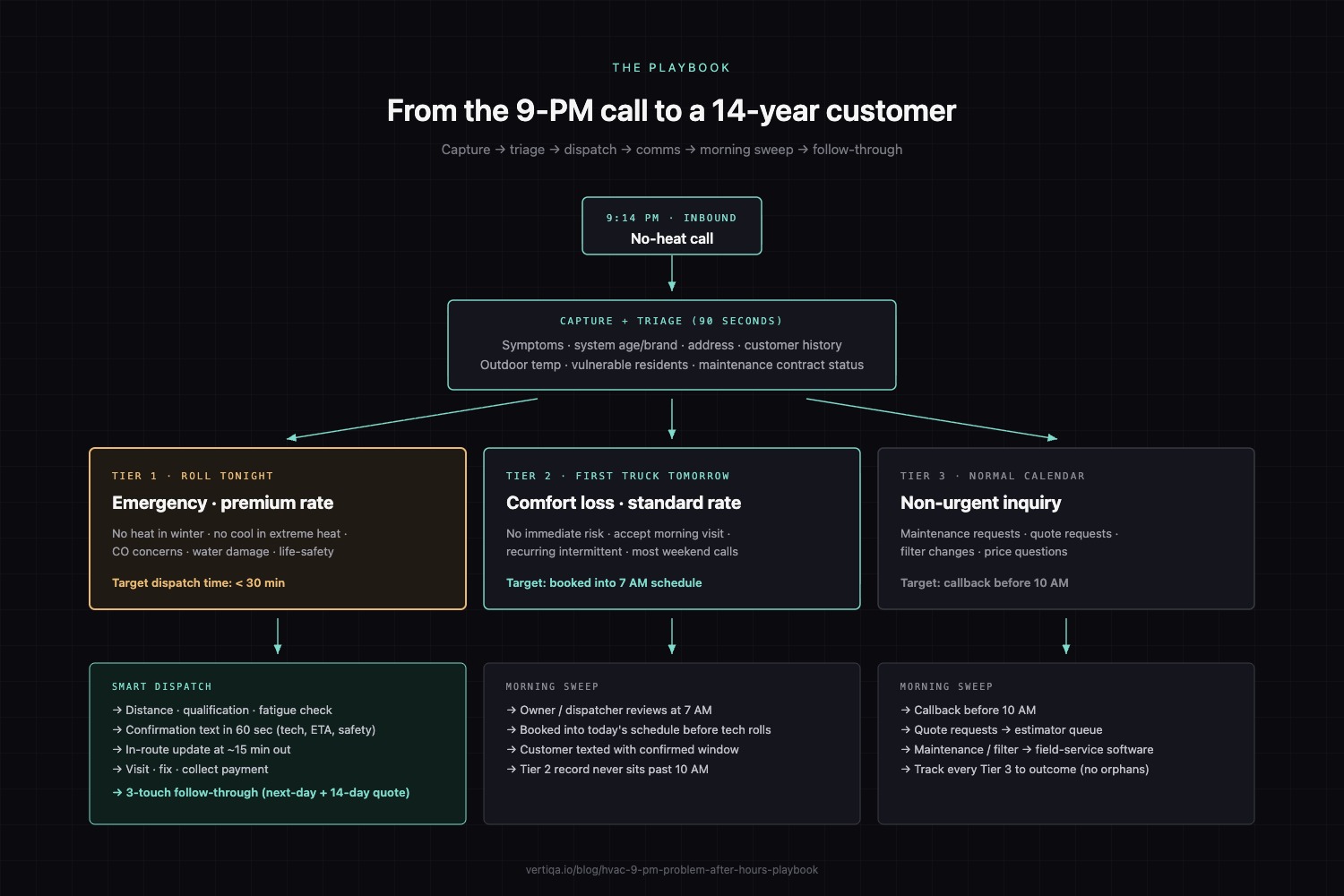
2. Triage by tier (not by feel)
Build your triage rules ahead of time, written down, and use them whether the call is answered by a human or an AI. Three tiers cover 95% of HVAC inbound:
Tier 1 — Roll tonight, premium rate. No heat in winter (especially with elderly residents, infants, or below-freezing outside temps). No water heat for 24+ hours. No cooling in extreme heat (>92°F outside) with elderly residents or medical needs. Carbon monoxide concerns. Water leaks from a unit causing property damage. Anything where waiting 8 hours risks harm or major damage.
Tier 2 — Schedule first-truck-out tomorrow, standard rate. No heat or cooling without immediate safety risk. Comfort-loss situations where the home is uncomfortable but not unsafe. Recurring intermittent issues. Anything where the customer accepts a same-day or next-morning visit.
Tier 3 — Schedule in the normal calendar. Maintenance requests. Quote requests. Filter changes. Anything that wasn't an emergency when it became a call, but was a "I might as well call now while I'm thinking about it" at 9 PM.
The customer determines which tier; you confirm by asking the right two or three questions. Most HVAC operators do this in their heads with experience. Writing it down gets you consistency when the call is answered by anyone other than you.
3. Smart dispatch — distance, qualification, fatigue
For Tier 1 calls, you need three pieces of data fast:
Distance/time — who's actually closest, in evening traffic, to the customer's address
Qualification — which techs can confidently work on the customer's brand and system type
Fatigue — who has already been on for 10+ hours today, and who hasn't
Most field-service platforms handle the first two. Almost none handle the third. Build a rule with your team that no tech rolls past hour 12 except for life-safety calls. This is not just an HR thing — a tired tech misdiagnoses, mishandles a customer, and is more likely to be in an accident. The cost of "we always dispatched whoever was up" is hidden in the comebacks and the workers' comp claims.
For a busy shop, a good after-hours dispatch tool can suggest the right tech within 30 seconds. If you're picking the on-call tech by which name comes up first in your group chat, you have a process gap that's costing you money.
4. Customer communication during the wait
Between the call and the truck arriving, two things should happen automatically:
Confirmation text within 60 seconds: tech's name, ETA window, what the customer should do in the meantime (e.g., for no heat, "we've dispatched [tech]. ETA 9:45-10:15 PM. Please leave a porch light on. If you smell gas or hear unusual noises, leave the house and call 911.")
In-route update when the tech is ~15 minutes out, with a live ETA
This is the single highest-leverage customer-experience upgrade in HVAC and the cheapest to set up. It's also where Tier 1 dispatch goes from "well-handled emergency" to "customer story they tell three neighbors about."
5. The morning sweep
Not every after-hours call is Tier 1. The 9:40 PM call asking about a quote on a new system, the 11 PM filter inquiry, the 6 AM weekend "my AC is making a weird noise" — these all need follow-up that doesn't fall through the cracks.
Build a 7 AM ritual. Before any tech rolls, somebody (owner, dispatcher, office manager) goes through every inbound from the previous evening. Tier 2 calls get booked into the day's schedule. Tier 3 calls get a callback before 10 AM. No after-hours capture should sit untouched past 10 AM the next morning.
This is a process discipline, not a tool. The tool just makes the inbound visible.
6. The compounding follow-through (where the real money lives)
A Tier 1 no-heat call rolls. You fix it. The customer pays $480. You leave.
This is where 80% of HVAC shops stop, and where the top 20% start.
The top shops treat every emergency call as a three-touch sequence:
The visit itself — service, fix, collect payment.
The next-day call — "everything still working OK? How did the unit sound this morning? Anything we missed?" Five minutes of effort. Reinforces trust. Surfaces the system-age conversation if the customer is on a 15-year-old unit.
The 14-day quote and maintenance attach — system replacement quote if applicable, maintenance contract pitch. Done well, this is where a $480 service ticket becomes a $9,200 install and a $320/year recurring revenue line.
The system replacement won't always happen on a 14-year-old unit you serviced at 9 PM. But the math is friendly: even a 20% conversion rate from emergency-repair-on-old-system to system-replacement, on a typical residential ticket, more than pays for the after-hours coverage program for the year.
What "good" looks like: four numbers
If you want to actually measure whether your after-hours system is working, track these four. Calculate monthly.
After-hours capture rate. Real-lead inbound calls answered live (or by AI with confirmation) ÷ total real-lead after-hours inbound. Target: 90%+. Below 70% = emergency.
Tier 1 dispatch time. Median minutes from call answered to a confirmed tech on the way. Target: under 30 minutes. Above 60 minutes = customers calling competitors mid-wait.
After-hours-to-install conversion. Tier 1 emergency calls that result in a system-replacement quote within 30 days ÷ total Tier 1 emergency calls. Target: 15-20% for a well-run book. Higher means you're identifying the old systems.
After-hours customer rebook rate. After-hours emergency customers who return for service within 12 months ÷ total after-hours emergency customers. Target: 60%+. Lower means you're winning the emergency and losing the relationship.
These four together tell you whether your 9-PM system is actually working or whether you're just answering more calls without monetizing them.
The honest comparison: live answering vs. AI receptionist vs. on-call tech
We promised an honest read. Here it is.
Live answering service | AI receptionist | On-call tech rotation | |
|---|---|---|---|
Coverage | 24/7 if you pay for it | 24/7 by default | Whoever's on, whenever |
Cost (typical HVAC) | $300-$1,200/mo | $200-$1,000/mo | "Free" but real cost in tech burnout + bad CX |
Call quality | Trained humans following your script | Depends heavily on vendor — listen to live calls before you buy | Highly variable — tech at hour 11 ≠ owner at 9 AM |
Triage capability | Scripted; flags emergencies | Can ask structured triage questions and capture data into your system | Depends on the tech |
Dispatch into your software | Manual; phone or message to on-call tech | Automatic ticket creation in your field-service platform with full context | Manual |
Customer communication during wait | Manual SMS/call from your team | Automated confirmation + ETA | Manual or skipped |
Scaling cost | Linear with volume | Mostly flat | Burns out a finite number of humans |
Best when | You want trained humans and your volume is moderate | You want full 24/7 capture, structured data, and automatic dispatch into your software | You're tiny enough that the owner can take all the calls |
For most HVAC shops between 3 and 30 techs, the honest answer is either a good live answering service that knows HVAC, or a well-implemented AI receptionist that integrates with the field-service platform you already use. The on-call tech rotation works when you're truly small, but it is not a real after-hours capture program — it is hoping the right tech is awake.
A weekly cadence that makes this stick
You don't need a dashboard. You need a weekly habit.
Every Monday morning, look at four things:
After-hours inbound from the previous week — by tier
Tier 1 dispatch time (median and the worst single case)
Any customers who waited >60 minutes — call them this morning to apologize and check in
Quote conversion from any Tier 1 calls that turned into install opportunities
Fifteen minutes a week. The 9-PM problem doesn't get solved by a tool installation. It gets solved by an owner who looks at the numbers every Monday and asks where the gap was.
What we built
We built Vertiqa to be the operating layer underneath all of this — the thing that captures the call, triages with your tier rules, lands the ticket in your field-service platform with full context, dispatches the right tech, texts the customer the confirmation and ETA, and queues the next-day and 14-day follow-up automatically. We make one of the AI receptionist options listed above. We're biased.
What we'd ask of you, whether you ever look at us or not, is this: stop treating after-hours as a rotation and start treating it as a system. The math is too lopsided to keep losing 9 PM calls to voicemail. The shops that figure this out are quietly compounding while their competitors blame the market.
Hear our AI receptionist live in 90 seconds: (678) 716-4200 — no signup. See the live demo: vertiqa.io.
Other posts that pair with this one:
How many leads is your voicemail actually eating? — the 30-day DIY audit. Run it on your shop.
Speed-to-lead is the whole game. — the research backbone.
Your CRM isn't broken. Your follow-through is. — the manifesto.
Sources
Novacall AI — Missed Call Statistics for Small Business by Industry, 2026
HVAC unit economics (service tickets, install ranges, maintenance contract values, emergency premiums, repair-to-replacement conversion windows) are typical industry ranges drawn from common trade-publication benchmarks. Verify against your own service-area numbers before quoting externally.