Enrollment overview
Run classes and programs in Vertiqa — batches with schedules and capacity, students and their guardians, attendance, fee plans and invoices, all in one place.
Enrollment is for organizations that run recurring classes or programs: a yoga or dance studio, a martial-arts school, a tutoring center, a swim program. You group students into batches, give each batch a schedule that generates its sessions, take attendance at each session, and bill students from fee plans.
Enrollment is part of Full mode. Find Dashboard, Cohorts, Students, Schedules and Fee Plans under Enrollment in All tools, and pin the ones you use to your sidebar.
The building blocks
- Batch — a group of students who train together, such as Morning Vinyasa. A batch has an optional capacity. The sidebar item is called Cohorts; the pages themselves call them batches. See Batches.
- Student — a CRM contact you've made a student. The student record adds a level, guardians and the student's enrollments, attendance and assessments; the name, email and phone stay on the contact. See Students.
- Enrollment — one student in one batch, with a status (Active, Pending, Waitlisted, Paused, Completed or Withdrawn) and a source (Walk-in, Converted from prospect, Referral, Transfer or Other). See Enroll and transfer students.
- Schedule — a recurring timetable that generates sessions, attached to one or more batches. See Schedules.
- Session — one class on one date. Each has a roster where you mark who came. See Take attendance.
- Fee plan — a rate for a batch: an amount and currency on a cadence (one-time, monthly, per term or a class package). Invoices come from fee plans. See Fees and payments.
The dashboard
Open Enrollment → Dashboard (route /enrollment) for the whole program
at a glance.
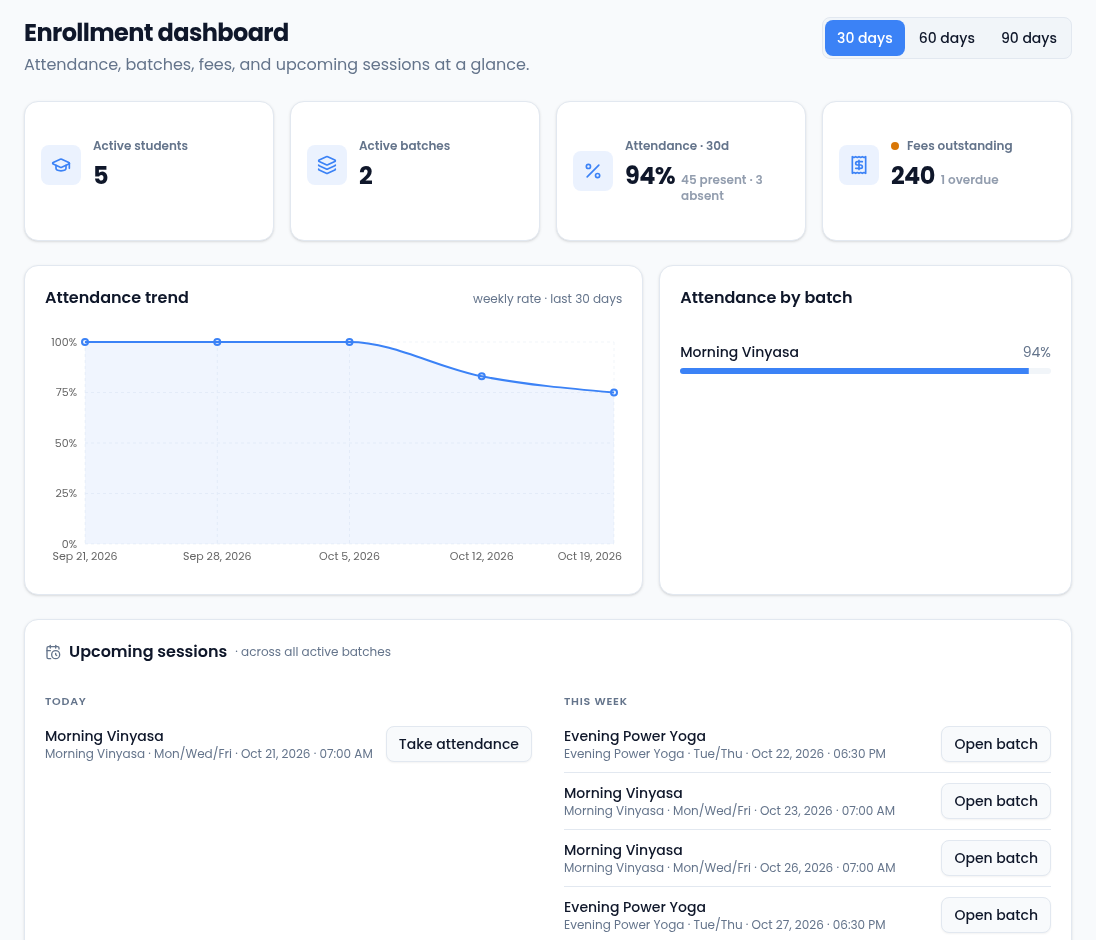
- 30 days, 60 days and 90 days set the window for the attendance tile and the trend.
- Attendance is the share of marked attendance that was present or late. Students nobody has marked yet don't count either way. (The batch report counts present only, so its figure can be a little lower.)
- Fees outstanding is the unpaid total across all students' invoices. It turns amber when an invoice is overdue. It's a plain number because your fee plans can use different currencies.
- Attendance by batch ranks your batches; select one to open it.
- Upcoming sessions lists today's classes, with Take attendance, and the rest of the week, with Open batch.
Set up Enrollment
- Create a batch for each class group.
- Create a schedule for when it meets, and attach it to the batch.
- Add a fee plan and set it as the batch's default.
- Turn contacts into students, then enroll them.
- Take attendance at each session, and check the batch report for students falling behind.
Who can do what
| Permission | Lets you | Given to |
|---|---|---|
| View Enrollment Records | See every Enrollment page | Owners, admins, managers and members |
| Manage Enrollment Records | Create batches and students, enroll, transfer and withdraw, take attendance, attach schedules, set a batch's default fee plan, generate invoices and record payments | Owners, admins and managers |
| Manage Session Series | Create, edit, pause and archive schedules | Owners and admins |
| Manage Fee Plans | Create, edit and archive fee plans | Owners and admins |
| Record Assessments | Record and publish a student's assessment | Owners, admins and managers |
| Manage Assessment Schemes | Create and edit a batch's assessment schemes | Owners and admins |
Buttons for things you can't do don't appear. Change these under Permissions.
Messages to students and guardians
Some Enrollment actions send a message to the student's guardians, or to the student when they have no guardian: a new enrollment, being marked absent, a scheduled makeup and a published assessment. They go by email or text message, to whatever the contact has on file. Being marked present doesn't send anything.