Automation that runs your SOP — and never emails a customer alone.
Deterministic if-then automations you define, governed workflows with versioned publishing and run history, and AI-driven goals — three surfaces for three jobs, all sharing one hard rule: external messages stay manual-review only.
No credit card needed
Same trigger, same steps, every time
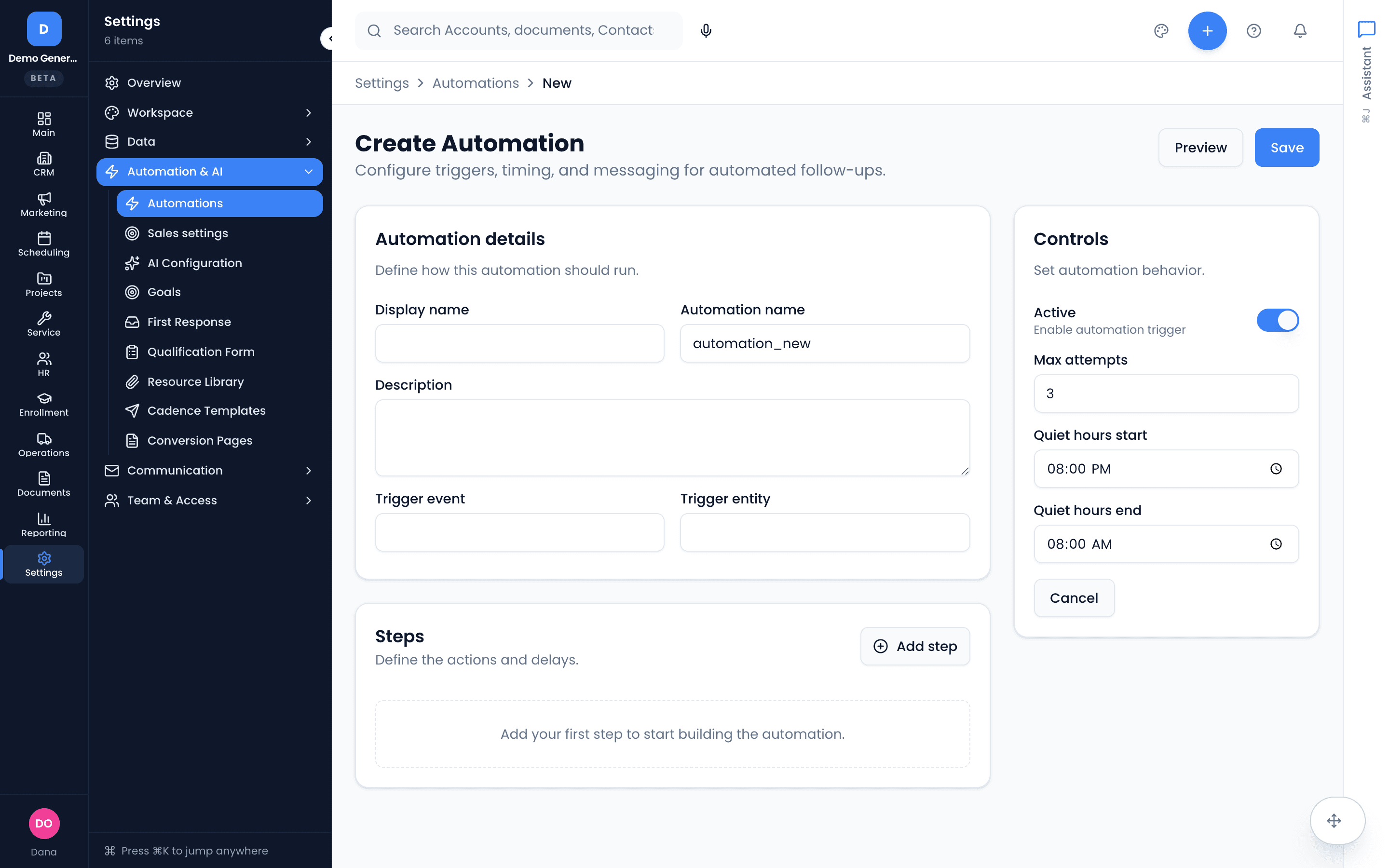
An automation is a multi-step sequence that fires on record events — a lead is created, an opportunity changes stage, a job completes. Deterministic by design: the same trigger and inputs always produce the same actions, so your SOP runs the way you wrote it.
- Pick a trigger, string actions: send email, create task, update field, branch on condition
- Template cards with live preview; enable or disable without leaving the list
- Dry-run most automations against a sample record before flipping them on
Build governed flows on a canvas
Author workflows visually — triggers, action nodes, conditions — with validation that names each problem before you can publish. Some workflows ship with your pipeline pack; the ones you build sit beside them, versioned and observable.
The builder is a desktop surface — on mobile you can monitor runs, not author flows.
- Canvas with add-node menu, per-node configuration, and autosave
- Action nodes like append timeline event, add tag, send notification, draft customer reply, start an agent run
- Branch on any field — “if the source channel is voice, do this instead”
- Validation blocks on errors, publishes on warnings — each error names its exact field
You see every customer-impacting node before go-live
Publishing opens a review that buckets the flow’s nodes by impact — human review gates, customer-facing output, agent launches, child workflows, stage-gate decisions — and confirms the standing rule: external messages stay manual-review only. Drafts go to a queue; a person sends.
- Customer-impacting nodes listed explicitly at publish time
- “Draft customer reply” writes to a review queue — never straight to the customer
- Published versions are immutable; in-flight runs keep the version they started on
When something stops, you can see exactly where
Every execution lands in run history with a status and a node-by-node timeline. Open a failed run to see which node stopped, why, and retry or cancel — automation you can debug beats automation you have to trust.
- Run statuses: completed, waiting, failed
- Node timelines show exactly where execution stopped
- Retry and cancel from the run, with failure details attached
The right tool for each kind of “automatic”
Automations for deterministic if-then logic you own. Workflows for governed, versioned, observable definitions — yours or your pack’s. Goals for AI-driven, confidence-scored proposals. They share one substrate, one customer record, and one approval discipline.
- Automations: you define trigger and steps — predictable by construction
- Workflows: pack-shipped or built, published as immutable versions
- Goals: agents propose; you set the autonomy dial per goal
 Zapier
 MakeFor the flows between your core tools — nothing to wire, nothing to babysit. Keep Zapier for its thousand-app catalog; ours talk to one shared record.
Asked plainly
What’s the difference between automations, workflows, and goals?
Three surfaces, one rule of thumb. Automations are yours: deterministic if-then sequences you define — same trigger, same inputs, same result, every time. Workflows are governed definitions — shipped by a pipeline pack or built in the builder, versioned on publish, observable in run history. Goals are AI-driven: an agent watches for records matching a condition and proposes actions with confidence scores. Use the simplest one that does the job.
Can a workflow email my customer automatically?
No. External messages stay manual-review only — the “Draft customer reply” action writes a draft to a review queue, and the customer never sees anything until a person approves it. The publish-review dialog explicitly lists every customer-impacting node before a workflow goes live, so there are no surprise sends.
Can I test before turning something on?
Yes, on both surfaces. Most automations support a dry-run against a sample record before you enable them. Workflows validate before publishing — errors block, warnings don’t — and every execution lands in run history with a node-by-node timeline, so you can see exactly where a run stopped and retry it.
What happens to running workflows when I change a definition?
Publishing creates an immutable version. New runs use the new version; runs already in flight keep the version they started on. Your mid-flight approvals never change shape underneath you.
Dig into the details
Every claim on this page is documented in the help center.
Related: Goals · Follow-Up Tracking · Vertiqa vs the HubSpot + Calendly + Zapier stack
Automate the process. Keep the judgment.
Thirty days, every tool, no credit card. Wire your inquiry-received flow in an afternoon — drafts wait for you, nothing sends alone.
Every tool included. No credit card needed.