Google Classroom connector
Connect Google Classroom read-only to track course completion, overdue coursework, and stalled learners in Vertiqa.
The Google Classroom connector reads your Classroom courses, rosters, and coursework into Vertiqa to power the Training progress dashboard. It is strictly read-only — Vertiqa never writes anything back to Google Classroom.
Connecting
-
Open Settings → Integrations and find Google Classroom in the Education category.
-
Select Connect. Before the Google sign-in, Vertiqa asks you to confirm the account belongs to an adult (18+) educator or corporate learner — never a K-12 minor student. Tick the box and select Connect. This confirmation is required every time; a connect attempt without it is denied.
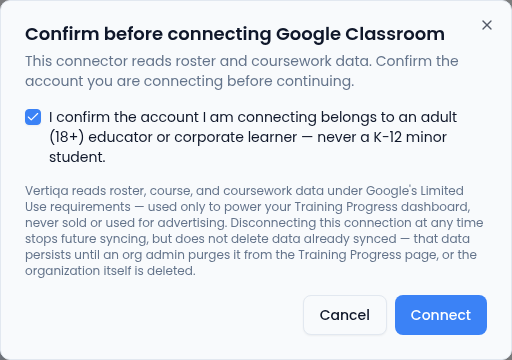
Connect stays unavailable until you tick the box. -
Complete the Google consent screen. The requested scopes are read-only: courses, rosters, learner email addresses, and coursework submissions.
Connections are per teacher — each teacher connects their own Google account, just like calendar connections.
How synced data is handled
The connect dialog states the posture up front: Vertiqa reads roster, course, and coursework data under Google's Limited Use requirements — used only to power your Training Progress dashboard, never sold or used for advertising.
Disconnecting stops future syncing but does not delete data already synced. Synced Classroom data persists until an organization admin purges it with Purge synced data on the Training progress page (next to Connector health), or the organization itself is deleted. Learners are matched to CRM contacts by email; learners that can't be matched are shown as Unmatched on the dashboard rather than silently dropped.
Keeping the connection healthy
- If Google authorization lapses, the connector shows Needs attention in Integrations and the Training progress page shows a reconnect banner. Use Reconnect to re-authorize.
- While a connection is broken or hasn't synced recently, dashboard numbers are labeled stale — stale data is never presented as fresh.
- The dashboard's Connector health panel shows the connection status and recent sync runs, read-only.
Follow-up suggestions
When a learner stalls (overdue coursework, no recent activity), Vertiqa can propose a follow-up task — for example "Follow up with a stalled learner." Proposals appear in the Command Center queue for a human to Approve or Reject. Nothing is created or sent automatically.