Assignment rules
Decide who owns each new inbound inquiry — one person, or a rotation through a group of reps.
Reviewed AdminVertiqa 1.75+
Assignment rules pick an owner for every new inbound inquiry, so it
reaches a rep straight away. Open Settings → Assignment Rules (route
/settings/assignment-rules).
With no rules, new inquiries keep their default owner. When no rule matches, the inquiry stays unassigned in the Inbox.
Create a rule
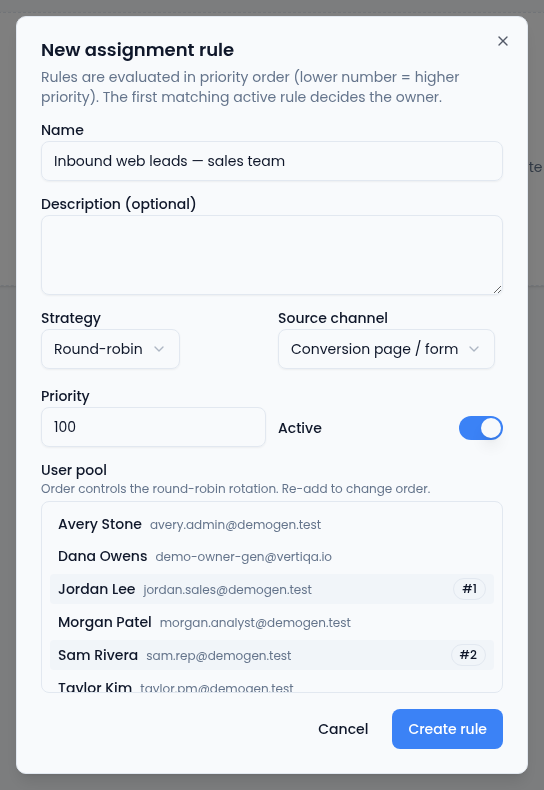
- Select New rule.
- Enter a Name, and a Description (optional).
- Choose the Strategy:
- Round-robin takes turns through a group of people.
- First available (lowest load) is meant to pick the least busy person. For now it takes turns in the same way as round-robin.
- Specific user sends every match to one person.
- Choose the Source channel the rule applies to: Any source, Email, Conversion page / form or Voice.
- Set the Priority. A lower number is checked first.
- Pick the Specific user, or for round-robin, select people for the User pool. The order you select them in is the order they take turns.
- Leave Active on, and select Create rule.
Which rule wins
The first matching active rule decides the owner. A rule for a particular source channel is checked before an Any source rule. Between rules that are equally specific, the lower Priority wins.
Each rule in the list shows whether it's Active or Paused, its strategy, priority and source, and who it routes to. Use Edit to change a rule, or the bin to delete it.