Create a campaign
Start a marketing campaign from a template or by cloning one, read its performance, draft copy with AI content assist, and move it through its lifecycle — launching through a Command Center approval.
A campaign groups the channel activities for one marketing push, such as a
seasonal offer or a nurture sequence, and tracks what they produce. Open
Marketing → Campaigns (route /marketing-campaigns).
Start a campaign
Every campaign starts from a template or a clone of another campaign. There's no blank campaign, so the channel activities come with it.
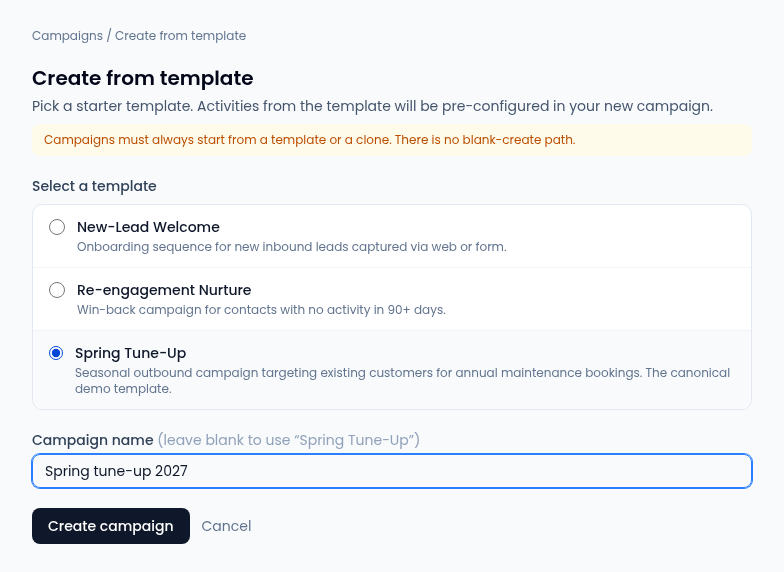
- On Campaigns, select From template or Clone existing.
- Pick a template, or the campaign to copy. A clone copies every channel activity into a new draft.
- Optionally type a Campaign name (for a clone, Clone name). Left blank, a template campaign takes the template's name and a clone takes the source's name with "(copy)".
- Select Create campaign (or Clone campaign). The new campaign opens as a Draft. If it can't be created, the reason shows above the button.
The templates come from your organization's setup. If the list says No templates available, ask your admin.
Read a campaign
Select a campaign's name or View to open it.
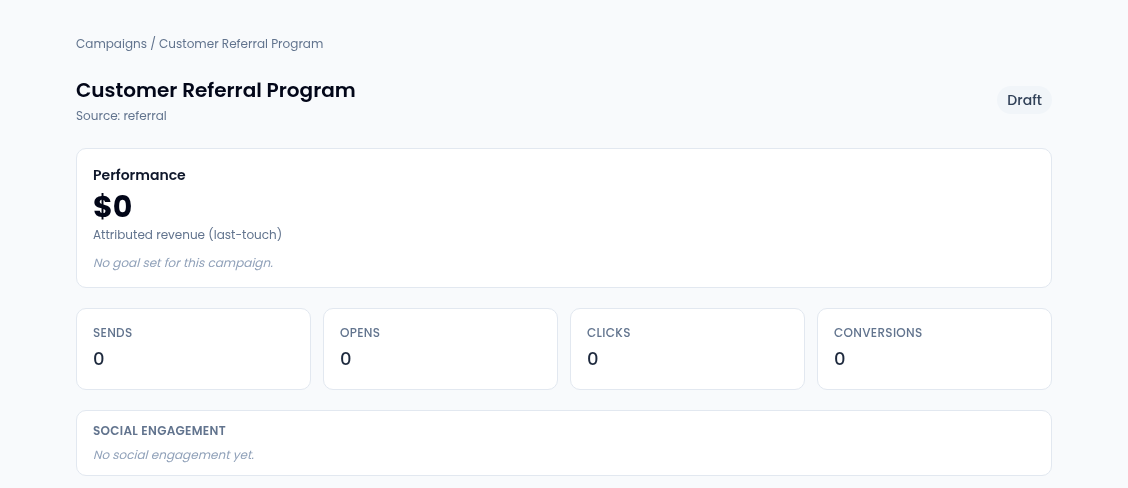
- Performance shows the revenue from won deals the campaign gets last-touch credit for, and progress against the campaign's goal if it has one.
- Sends, Opens, Clicks and Conversions count the campaign's activity. Opens and deliveries alone are low-confidence touches: they're flagged separately and never counted as conversions.
- Social engagement counts the campaign's social touches, high-confidence and low-confidence separately. With an A/B test, a Variant breakdown follows.
- Channel activities lists the activities the template or clone brought, with any A/B variant and its share. Social posts lists the posts linked to the campaign from Social.
Draft copy with AI content assist
AI content assist drafts copy for you to review. Choose Campaign email or Content brief, adjust the instructions in the box, and select Generate draft. When it's ready you get subject suggestions and an editable draft. Create authorization draft turns it into a draft of the send authorization; it still needs approval before anything goes out.
Move a campaign through its lifecycle

A campaign is Draft, Scheduled, Active, Paused, Completed or Archived. Under Lifecycle controls, Move to shows the next statuses allowed from where it is:
| From | Can move to |
|---|---|
| Draft | Scheduled, Active, Archived |
| Scheduled | Active, Paused, Draft, Archived |
| Active | Paused, Completed, Archived |
| Paused | Active, Completed, Archived |
| Completed | Archived |
| Archived | Nothing: it's the final status |
Launching is an approval. While a campaign is a draft or scheduled, the
card points you to the Command Center:
the launch is approved there (the marketing.campaign.launch action), and
that approval is what lets the campaign send.
Stop a campaign immediately
On an active or scheduled campaign, Kill campaign halts all of its channel activities at once: scheduled emails, sends in progress and pending activities. Confirm with Kill campaign in the dialog. Restarting it needs a new approval.