Build a segment
Define a marketing audience from contact, account and opportunity fields, preview who matches, and choose between a dynamic segment that keeps itself current and a static snapshot you rebuild.
A segment is a saved audience: the contacts that match a filter you build
from CRM fields. Campaigns use segments to decide who they reach. Open
Marketing → Segments (route /marketing-segments).
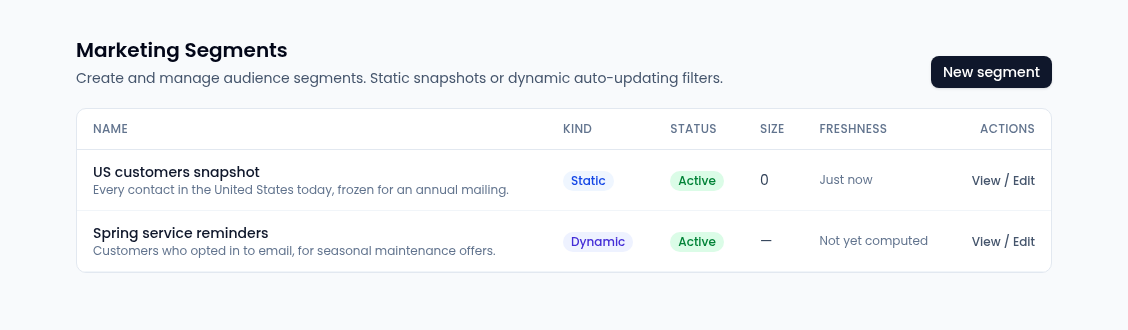
Each segment shows its Kind (Dynamic or Static), Status, Size and Freshness: when a static segment was last rebuilt, or when a dynamic segment's count was last worked out.
Dynamic or static
- Dynamic segments update as your CRM changes. Membership is worked out again when a campaign sends, so it always reflects who matches then.
- Static segments are a fixed snapshot of who matched when you created them. Use Rebuild membership to refresh it.
Create a segment
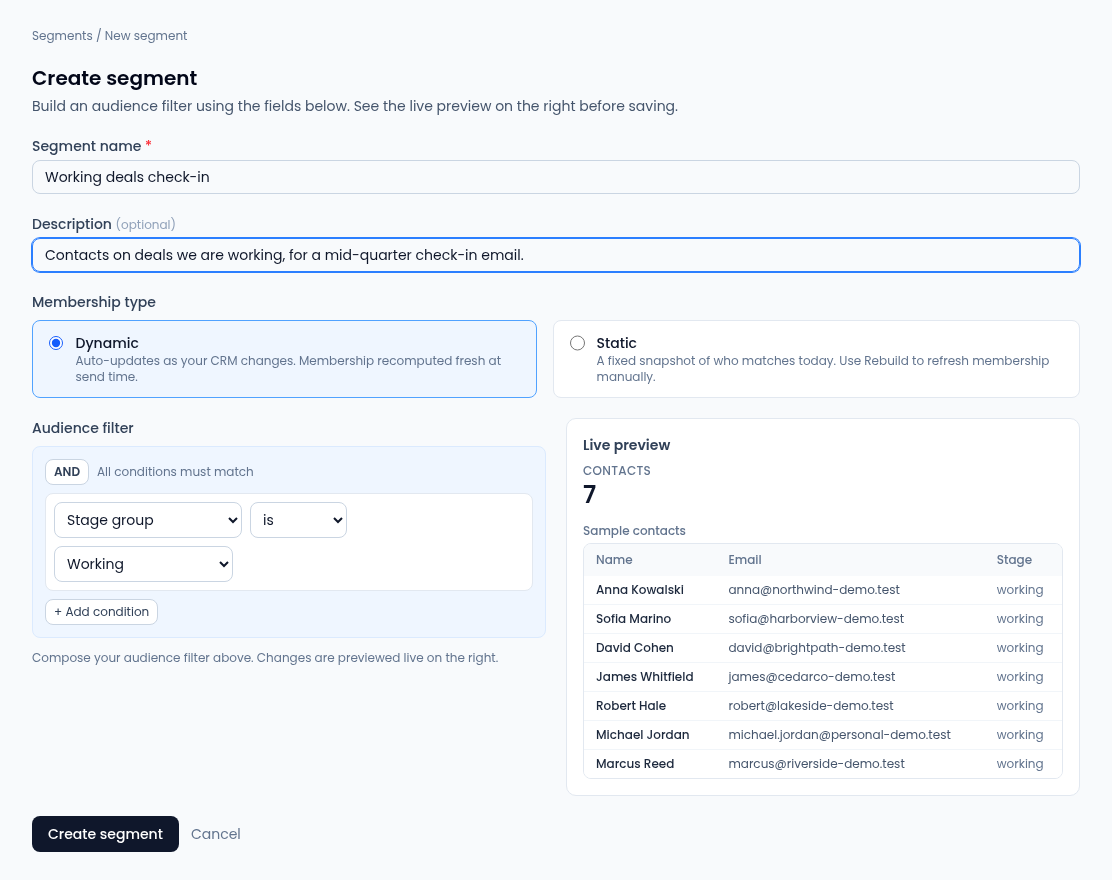
- On Segments, select New segment.
- Enter a Segment name and, optionally, a Description.
- Under Membership type, choose Dynamic or Static.
- Build the Audience filter: for each condition pick a field, an operator and a value. Select + Add condition for more. The AND button switches between All conditions must match (AND) and Any condition must match (OR).
- Check the Live preview: how many Contacts match, a sample of matching contacts with name, email and stage and, when it can be worked out, how many of them are sendable.
- Select Create segment. If it can't be saved, the reason shows above the button.
Fields you can filter on
Only these fields are offered, so a segment can't reach into data it shouldn't:
| Group | Fields |
|---|---|
| Contact | Email consent, SMS consent, WhatsApp consent, Tags, Lead source, UTM source, UTM medium, UTM campaign, Region / State, Country, Owner |
| Account | Account vertical, Account pack |
| Opportunity | Stage group, Is lead stage, Opportunity source, Campaign, Opportunity owner |
The operators depend on theThe operators depend on the field. Most fields offer is and is one of (type several values separated by commas). The source and UTM fields also offer contains and starts with. Tags offers contains, is one of and is not one of. Consent fields take Yes or No, or is empty / is not empty. Stage group takes Lead, Working, Closed Won or Closed Lost.
Lead source matches the source recorded on the contact's inquiries: referral, website, event, paid, social or other.
de: consent is checked again for every contact when a campaign sends.
If the preview says the filter is too complex or timed out, narrow it and try again.
Change or rebuild a segment
Select a segment's name or View / Edit. You can change its name, description, membership type and filter, with the same live preview, then select Save changes. Rebuild membership works out its membership again now; for a static segment, that's how you refresh the snapshot.