Insights
See which sources bring you inquiries, and how many of those turn into qualified leads, opportunities and won deals.
Insights answers one question: which sources are worth your time? It counts the inquiries each source brought in, and follows them through to qualified, opportunity and won.
Open Reporting → Insights in Full mode, or Insights in the Simple
mode navigation (route /insights).
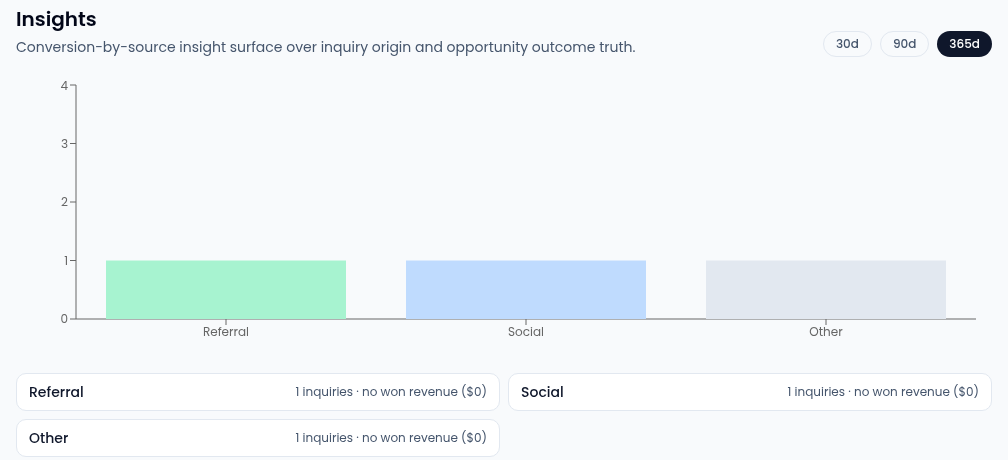
Read the chart
- Pick the window at the top right: the last 30d, 90d or 365d, counted from when each inquiry arrived. The page opens on 90 days.
- Each bar is one source, such as Referral, Website, Event, Paid or Social, with the busiest on the left. Sources with no inquiries in the window are left out.
- The bar's height is every inquiry from that source. Its shades split it into the inquiries that went no further, those qualified, those that became an opportunity in a working or closed pipeline stage, and those won.
- Under the chart, a card per source shows its inquiry count and the value of its won deals.
An inquiry counts as qualified once it's marked qualified or linked to an opportunity. Won and won revenue come from that linked opportunity, so an inquiry only shows as won when its opportunity is won.
Go from a source to its inquiries
Select a bar, or a source's card, to open the inbox (route /inbox)
filtered to that source and the same window. To work those inquiries, see
Triage inbound inquiries.
If the page is empty
"No inquiries in the last 30 days yet" means no inquiry with a source arrived in that window. Try a longer one. "Insights unavailable" means the figures couldn't load: wait a moment and reload the page.
Seeing Insights needs permission to view activities.