Example: new client assessment
Import a reviewed questionnaire as a multi-step conversion page with exact wording, a referral code captured from the link, a question that only shows when it applies, two permission statements, and an opportunity binding.
The business: a consulting firm whose intake questionnaire has already been written and reviewed, including permission wording their lawyer approved. Earlier attempts to rebuild it in a form tool quietly dropped questions and swapped the permission language for something generic.
The goal: publish the reviewed questionnaire exactly, split into short steps, and route each completed assessment to an opportunity the partner team works.
This is one of three conversion page examples. The walkthrough uses a trimmed, 13-question version of the questionnaire.
Start: import the specification
- Open Conversion pages (route
/crm/conversion-pages) and select Import specification. - Paste the JSON specification. Download schema gives you the format to write it against.
- Select Create draft.
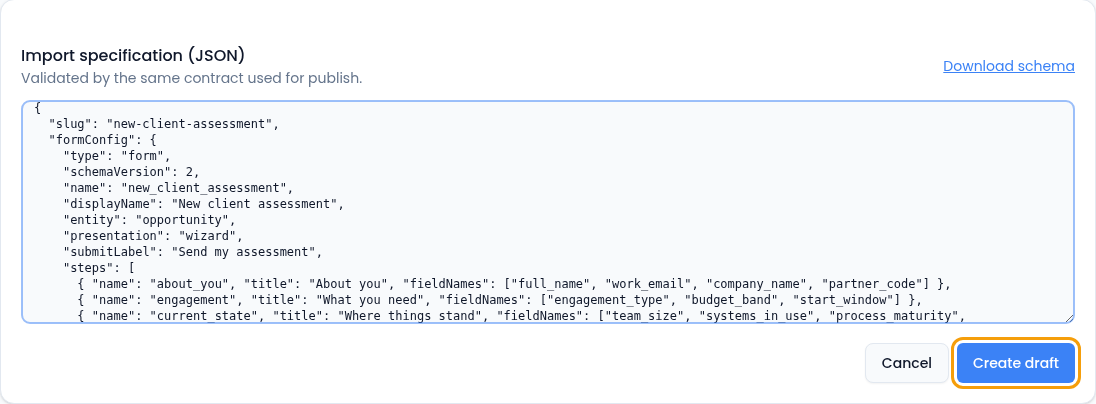
Import creates a draft with exactly the fields, IDs, options and wording in the specification. No AI, no paraphrasing. The same rules check the specification on import and again on publish, so anything import accepts will publish. The draft appears in the list. Select Edit draft to open it in the builder.
A trimmed version of the specification:
{
  "slug": "new-client-assessment",
  "formConfig": {
    "type": "form",
    "schemaVersion": 2,
    "name": "new_client_assessment",
    "displayName": "New client assessment",
    "entity": "opportunity",
    "presentation": "wizard",
    "steps": [
      { "name": "about_you", "title": "About you",
        "fieldNames": ["full_name", "work_email", "company_name", "partner_code"] },
      { "name": "engagement", "title": "What you need",
        "fieldNames": ["engagement_type", "budget_band", "start_window"] },
      { "name": "current_state", "title": "Where things stand",
        "fieldNames": ["team_size", "systems_in_use", "process_maturity", "blocker_notes"] },
      { "name": "permissions", "title": "Permissions",
        "fieldNames": ["consent_intake", "consent_marketing"] }
    ],
    "fields": [
      { "name": "full_name", "label": "Your name", "type": "text",
        "required": true, "semanticType": "full_name" },
      { "name": "work_email", "label": "Work email", "type": "email",
        "required": true, "semanticType": "email" },
      { "name": "company_name", "label": "Company", "type": "text",
        "required": true, "semanticType": "company" },
      { "name": "partner_code", "label": "Referral code", "type": "hidden",
        "hidden": { "source": "query", "key": "ref" } },
      { "name": "engagement_type", "label": "What kind of engagement?", "type": "select",
        "required": true,
        "options": [
          { "value": "assessment", "label": "One-off assessment" },
          { "value": "programme", "label": "Multi-month programme" },
          { "value": "advisory", "label": "Ongoing advisory" }
        ] },
      { "name": "budget_band", "label": "Approved budget range", "type": "select",
        "required": true,
        "options": [
          { "value": "under_25k", "label": "Under 25k" },
          { "value": "25k_100k", "label": "25k – 100k" },
          { "value": "over_100k", "label": "Over 100k" }
        ] },
      { "name": "systems_in_use", "label": "Systems in use today", "type": "multi_select",
        "options": [
          { "value": "erp", "label": "ERP" },
          { "value": "crm", "label": "CRM" },
          { "value": "spreadsheets", "label": "Spreadsheets" },
          { "value": "custom", "label": "Custom internal tools" }
        ] },
      { "name": "process_maturity", "label": "How documented are your processes?",
        "type": "rating",
        "scale": { "min": 1, "max": 5,
          "labels": { "1": "Nothing written down", "5": "Documented and followed" } } },
      { "name": "blocker_notes", "label": "What's blocking you right now?",
        "type": "textarea",
        "visibilityCondition": { "field": "process_maturity", "operator": "<=", "value": 3 } },
      { "name": "consent_intake", "label": "I agree to my answers being used to prepare a proposal.",
        "type": "checkbox", "required": true, "semanticType": "consent" },
      { "name": "consent_marketing", "label": "Send me occasional research briefings.",
        "type": "checkbox", "semanticType": "consent" }
    ]
  }
}
A specification that carries only formConfig, like this one, brings the
questions in exactly and leaves the rest to you in the builder: the page
sections, scoring, endings and submission binding. The reviewed questionnaire
comes in word for word, and you decide what happens to the answers. You can
also include pageConfig and bindingConfig in the specification to import
those too.
Two details worth copying:
-
partner_codeis hidden and read from the link. Referral partners send people to…/pages/new-client-assessment?ref=northline, and the code arrives with the answers without anyone typing it. In the builder, the field's type is Hidden metadata with source Query and keyref.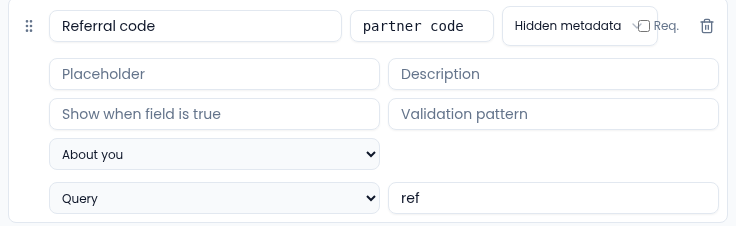
A hidden field reads its value from the page link. -
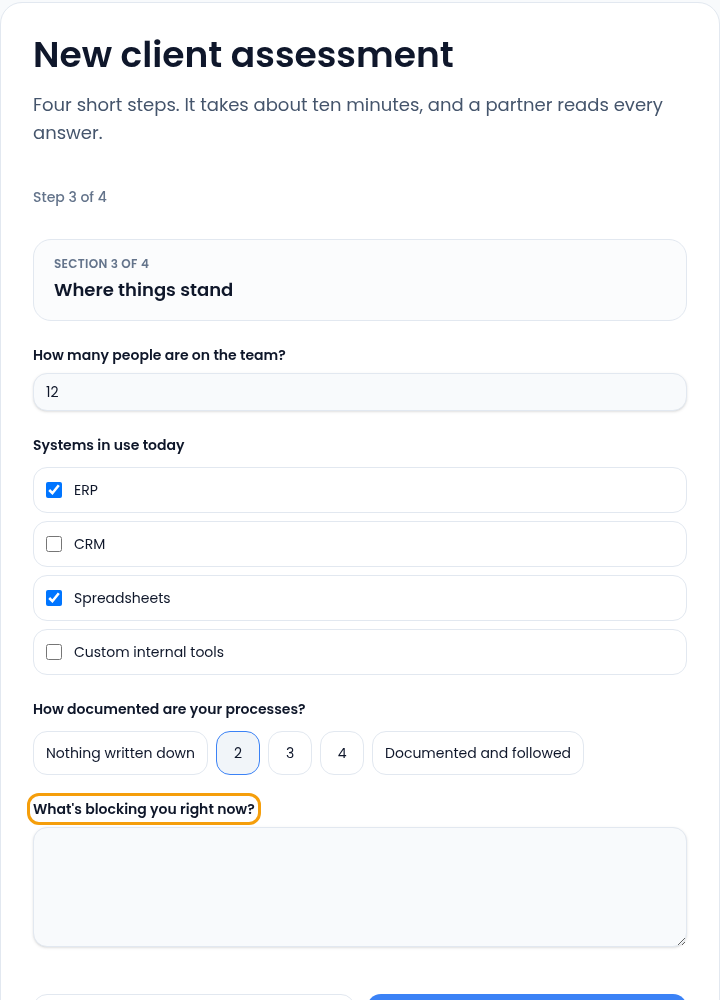
blocker_notesonly shows when it applies. It appears only for people who rate their process maturity 3 or below, so a mature team never sees a question that would feel accusatory. A field that stays hidden can't block submission, even when it's required.
Multi-step
Form tab. Set Form layout to Multi-step. Each step has a title and a field count; move steps up or down with the arrows, add one with + Step, and move a question to another step from its row under Form fields.
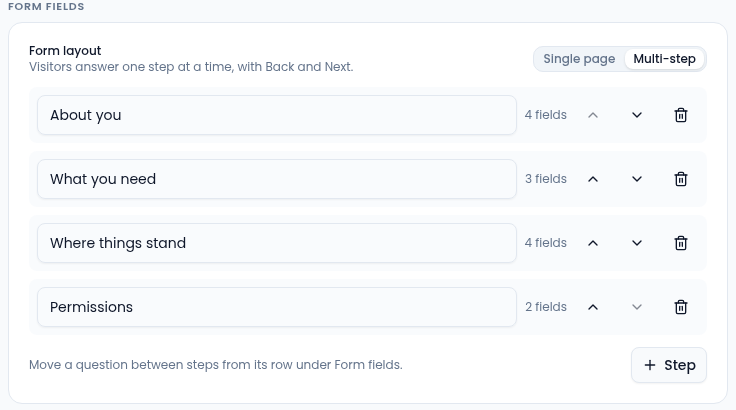
Visitors get a step counter, Back and Next, and each step is checked before they move on, instead of a wall of errors at the end.
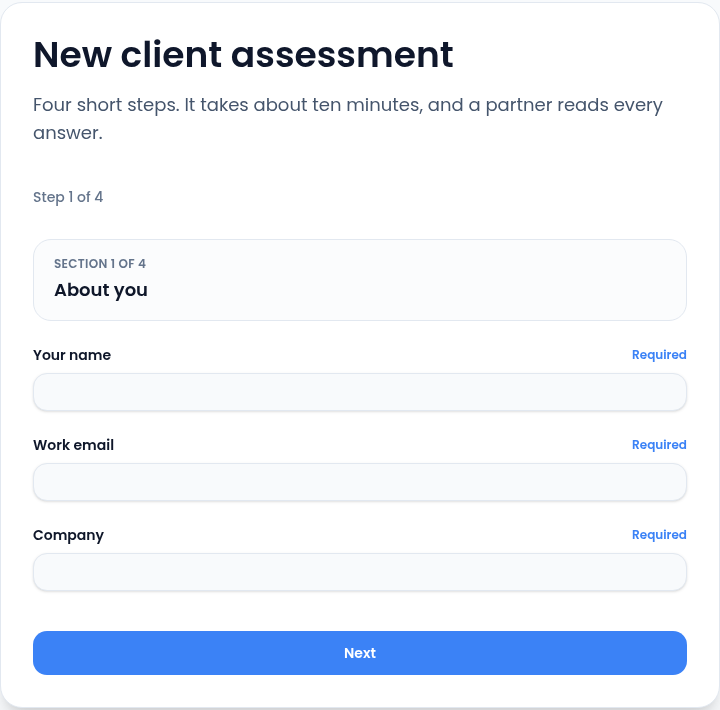
A step whose fields are all hidden, or that only holds hidden capture fields, is skipped rather than shown empty. On step 3, the blocker question appears as soon as someone picks 3 or lower:
Visitors can't save and finish later, so every question costs you. The page reports views, submissions and conversion for the page as a whole. Judge the length by that conversion rate, and cut questions until it stops improving.
Permission statements: why this page exists
Handoff tab, under Submission binding → Permission statements. Add two statements with Add statement, whose IDs match the two checkbox field IDs exactly.
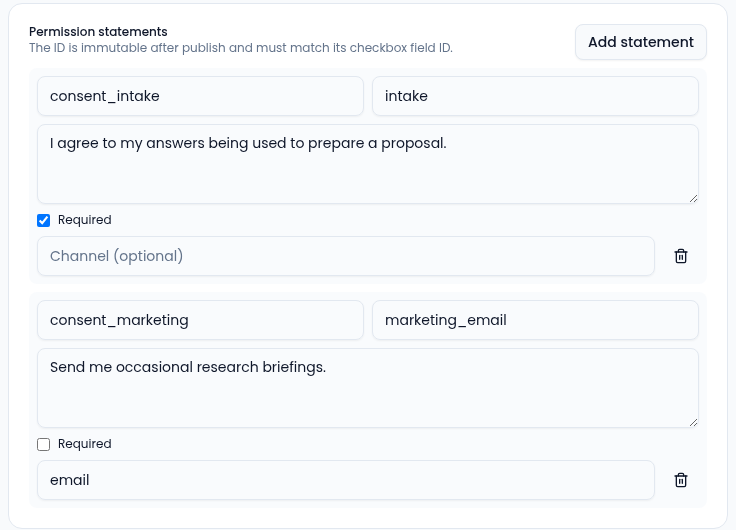
| Statement ID | Purpose | Required | Channel |
|---|---|---|---|
consent_intake | intake | Yes | None |
consent_marketing | marketing_email | No | email |
The published text is fingerprinted and stored with every submission, so each response proves which wording that person agreed to, not merely that a box was ticked. If you change the wording later, publishing asks you to approve the change, and earlier responses keep pointing at the old text.
People can withdraw either permission. A withdrawal made through the permission link updates the permission record without changing the submission that shows what they originally agreed to.
Scoring for triage, not rejection
Scoring tab for the rules and thresholds; Page tab for the endings they choose.
| Label | When | Points |
|---|---|---|
| Budget over 100k | budget_band = over_100k | 40 |
| Budget 25k–100k | budget_band = 25k_100k | 25 |
| Multi-month programme | engagement_type = programme | 20 |
| Low process maturity | process_maturity <= 2 | 15 |
| Under 25k | budget_band = under_25k | -20 |
Qualified at 50, review at 20, everything else Not a fit, which here means "worth a templated reply, not a partner's hour."
Endings:
- Qualified: "Your assessment is with a partner. Book the readout call now." with the Partner readout (45 min) booking link.
- Needs review: "We'll come back within two working days with either a proposal or a straight no."
- Not a fit: "This looks smaller than the engagements we take on. Here's the self-serve guide instead."
Binding: an opportunity, with the answers on it
Handoff tab, under Submission binding.
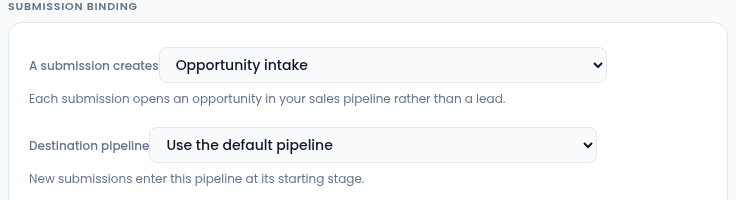
- A submission creates: Opportunity intake. These are qualified engagements, not early-stage leads, so they go straight into the sales pipeline. Pick the partner team's pipeline under Destination pipeline.
- Carry answers onto the record: map
engagement_typeto Engagement type,budget_bandto Budget band andpartner_codeto Referral partner. The partner team can then filter the pipeline by referral source without opening a submission. - Confirmation email: on. A long form that answers with silence is a form people assume is broken.
- Submission alerts: off. Nobody needs a ping per assessment; the team works the pipeline.
After publishing
Two weeks in, the firm rewords one permission statement. Publish lists the wording change for approval before it goes out. The wording that was live for those two weeks stays attached to those responses on the Versions & test tab. Rollback publishes a new version from the previous one; it doesn't rewrite what happened.
If an assessment arrives during a CRM outage, its dispatch error shows on the Submissions tab with Retry routing beside it. The answers are safe: recording the submission and creating the opportunity are separate steps on purpose.
When a client later asks what they were asked and what they agreed to, the submission sheet answers it on one screen: the answers, labelled with the form version they were collected under, the opportunity they created, and the permission records. If your retention settings have since removed the answers, the sheet says when, and keeps the routing and permission records.