AI OS overview
How Vertiqa's AI OS Activity & Health view turns operating data, agent loops, guardrails, usage limits, and daily queues into one governed control loop.
Vertiqa's AI OS is the operating layer that makes relationship work visible, queryable, and actionable. It connects customer records, projects, tasks, quotes, documents, communications, agent runs, and governance controls so the business can see what needs attention and decide what agents are allowed to do.
The goal is not to let agents mutate records freely. The goal is a closed loop: capture evidence, detect work or drift, route it into the right queue, require approval where needed, run every action through Vertiqa's governed services rather than direct database writes, and leave audit trails operators can inspect.
Getting started: open AI OS Activity & Health
Open AI OS Activity & Health at /ai-os to see your workspace's active
AI loops, guardrails, usage limits, recurring checks, alert rules, and
health metrics — all in one place, described in business language rather
than technical primitives.
Use Queue (or Command Center in Full mode) as your daily starting point for acting on the work AI loops surface.
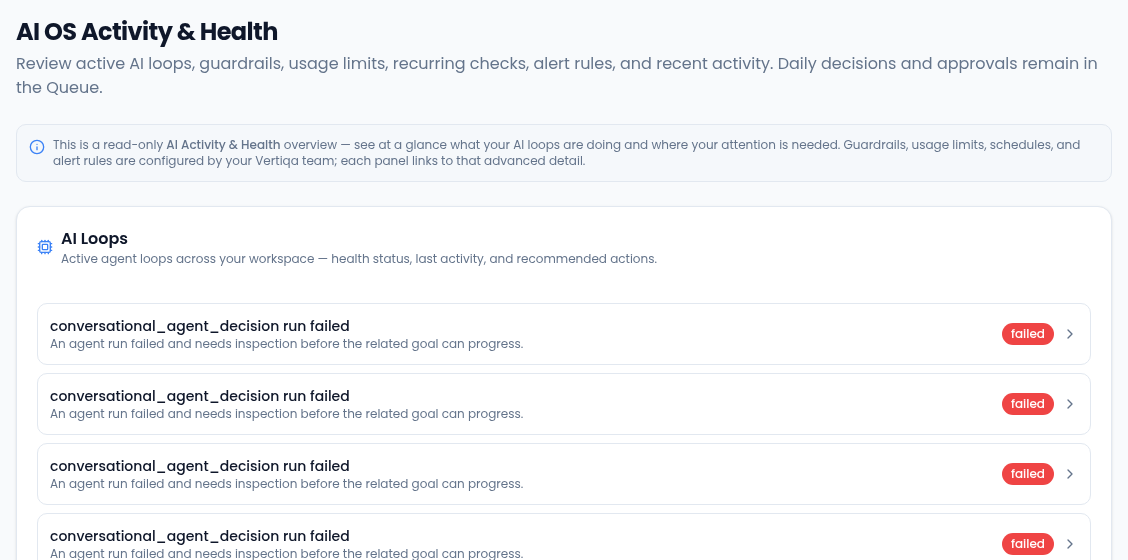
What the AI OS includes
AI OS Activity & Health at /ai-os shows:
- Loop overview — active AI loops across your workspace, health status, last activity, and recommended actions.
- Guardrails — per-agent approval rules and data scope controls that decide what each AI loop is allowed to propose or execute.
- Usage limits — spend and run-count ceilings across agents, so AI activity stays inside operating budgets.
- Recurring checks — scheduled AI loops such as sweeps or planned evaluations, with cadence, next run, and enabled/disabled status.
- Alert rules — drift rules that watch for stale quotes, missed follow-ups, and overdue tasks; noise level shows false-positive rate.
- Recent activity — last 20 AI loop runs with status, outcome, and cost.
- Approval queue — deep-link to
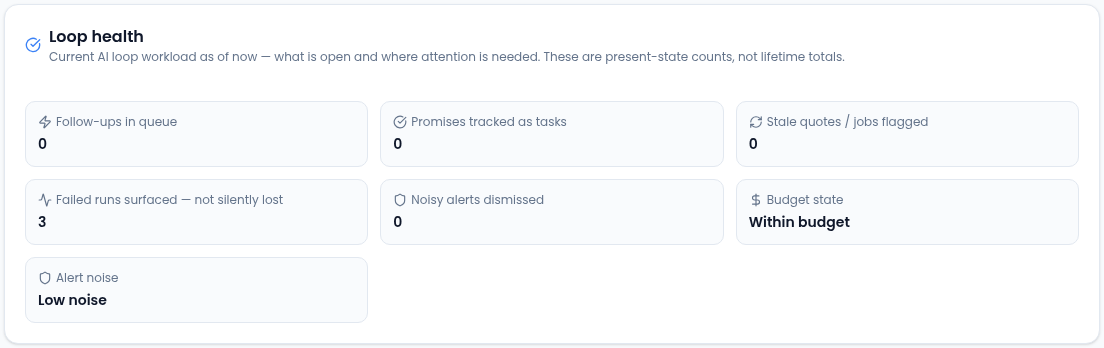
/queueand Command Center approval surfaces where human-triggered actions are reviewed. - Loop health — current workload and reliability signals in plain business language: follow-ups in queue, promises tracked as tasks, stale quotes or jobs flagged, failed runs surfaced, and noisy alerts dismissed.
Daily actions (approving drafts, closing commitments, snoozing items) happen in Queue and Command Center, not in AI OS Activity & Health.
How the loop works
- Vertiqa captures operating context from records, conversations, documents, workflows, schedules, and agent activity.
- Vertiqa normalizes that context into queue items, run state, guardrail decisions, usage, and alert rule signals.
- Operators use Command Center, Queue, or AI OS Activity & Health to inspect the reason, evidence, and next action.
- Actions run through Vertiqa's governed services, not direct database writes from the app.
- The result is written back to timelines, run history, audit logs, and cost telemetry so future review and automation can trust it.
Daily operator flow
Start in Queue for mobile or Simple mode triage. Use Command Center in Full mode when you want the full operating queue with filters, evidence, and detailed action controls.
Open AI OS Activity & Health (/ai-os) when you want to review active
loops, check whether guardrails or usage limits are in place, or understand
loop health across the workspace.
Use Recent activity in /ai-os when an item mentions a failed or stuck
run, then follow the advanced detail link for inspection.
Drafts are reviewable — no autonomous external send
AI loops produce drafts and proposals for operator review. External send (email, task creation, record mutation) remains human-triggered. The Approval queue is the gate. Nothing is sent without operator action.
Full mode and Simple mode
Full mode exposes the AI OS Activity & Health overview: loop status, guardrail review, usage limit review, recurring check visibility, alert rule status, recent activity, and links to advanced detail. Detailed setup remains administrator or Vertiqa-team work.
Simple mode uses the same governed services and records but presents the daily-use slice through Queue: what needs attention, why it matters, and the governed action to take. Simple mode does not create a second data model or a separate queue.
Related
- Command Center getting started
- AI OS admin setup
- Policies, budgets, and schedules
- Walkthrough: recover a dropped customer follow-up
- Walkthrough: safely turn on a recurring agent loop
- Walkthrough: handle a failed or blocked agent run
- Walkthrough: catch blocked or at-risk project work
- Walkthrough: catch missed or unconfirmed meetings
- Walkthrough: rescue a stale lead
- Walkthrough: protect a deal at risk
- Agent run recovery
- Drift alerts overview
- Agent library overview
- Goals overview
- Vee
Learn more about the AI assistant →