Walkthrough: catch blocked or at-risk project work
Use the AI OS queue to catch overdue dependencies, blocked tasks, and project work that would otherwise stall.
Use this walkthrough when project work depends on people noticing a blocked task, overdue dependency, or missing next step before the customer is affected.
Real-life example
The Hartwell network cutover has a task called "Confirm firewall rule changes." It blocks the install task scheduled for tomorrow. The predecessor is overdue, but the project owner has not opened the project today.
Setup
-
Make sure the project has tasks, owners, statuses, and due dates.
-
Add dependencies where one task blocks another.
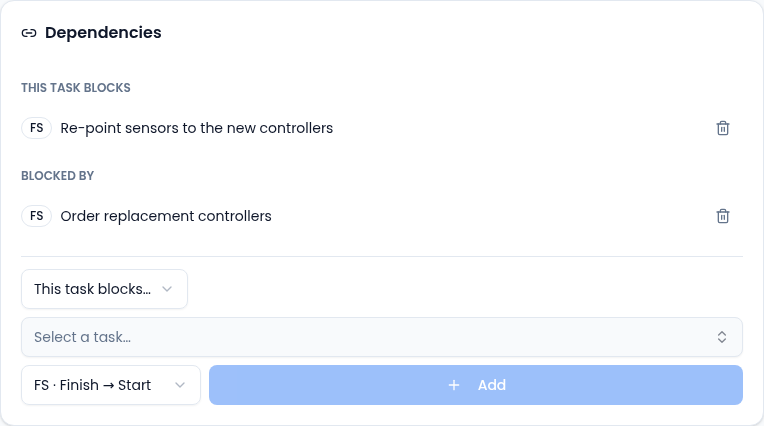
Add dependencies on the task's Dependencies card. -
Confirm the PM drift or blocked-work sweep is enabled by an admin.
-
Keep the first rollout propose-only so the queue recommends action instead of changing tasks automatically.
Run and inspect
Ask your Vertiqa team to run the relevant schedule manually (schedules are an internal setup tool), or wait for the next recurring sweep.
Check Recent activity in AI OS Activity & Health to confirm the run completed or produced a clear failure. Then open Command Center.
What you should expect to see
The queue item should identify the project or task and explain why it is at risk. Good evidence includes:
- overdue predecessor task,
- blocked successor task,
- owner or assignee,
- due date,
- project name,
- related customer or account when available.
Operator action
From the queue, open the task or project. Then take the real operating action:
- reassign the task,
- update due date,
- change status,
- create a follow-up task,
- remove an invalid dependency,
- snooze the alert if the delay is already known.
Dismiss only when the item is not actually blocking work.
Failure paths
If no item appears, check that tasks have due dates and dependencies. The AI OS cannot detect blocked work from empty project structure.
If too many items appear, narrow the drift rule threshold or schedule scope.
If the queue item points to the wrong task, fix the project data first: status, dependency, owner, or due date may be stale.
Success criteria
The project no longer depends on an invisible blocked task. The task has an owner action, updated state, or an explicit snooze/dismiss decision.
Related
Learn more about the AI assistant →