Service contracts
Record each recurring agreement with a client, its term and renewal date, so no renewal slips past without someone noticing.
A service contract is a standing agreement with a client: a support plan, a maintenance retainer, a monthly care plan. Each one has a term, a billing cadence and a renewal date, and Vertiqa flags the ones whose renewal is close or already past.
Open Service → Service Contracts (route /service/contracts). Service
Contracts is part of Full mode. The contract value is a reference figure: it
isn't billed from here, so invoices stay in
Invoices.
The Service Contracts list
-
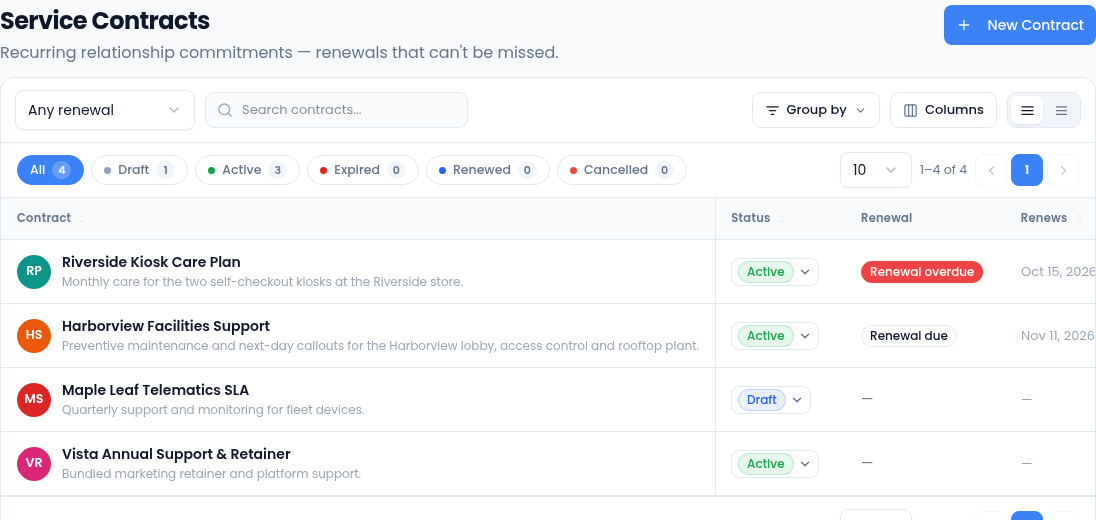
Status chips show only Draft, Active, Expired, Renewed or Cancelled contracts, with a count on each.
-
The Renewal column, and the Any renewal filter next to search, work from the renewal date of active contracts:
- Renewal due: the renewal date is within the next 60 days.
- Renewal overdue: the renewal date has passed.
- On track: the renewal date is further out.
Contracts with no renewal date, and contracts that aren't active, have no flag.
-
Search contracts looks through titles, descriptions and statuses. Group by groups the list by status or billing cadence, and Export CSV downloads what you're looking at.
-
Change a contract's Status right in the list, or select it to open it. The list only offers the changes a contract can make from where it is.
Record a contract
-
Select New Contract.
-
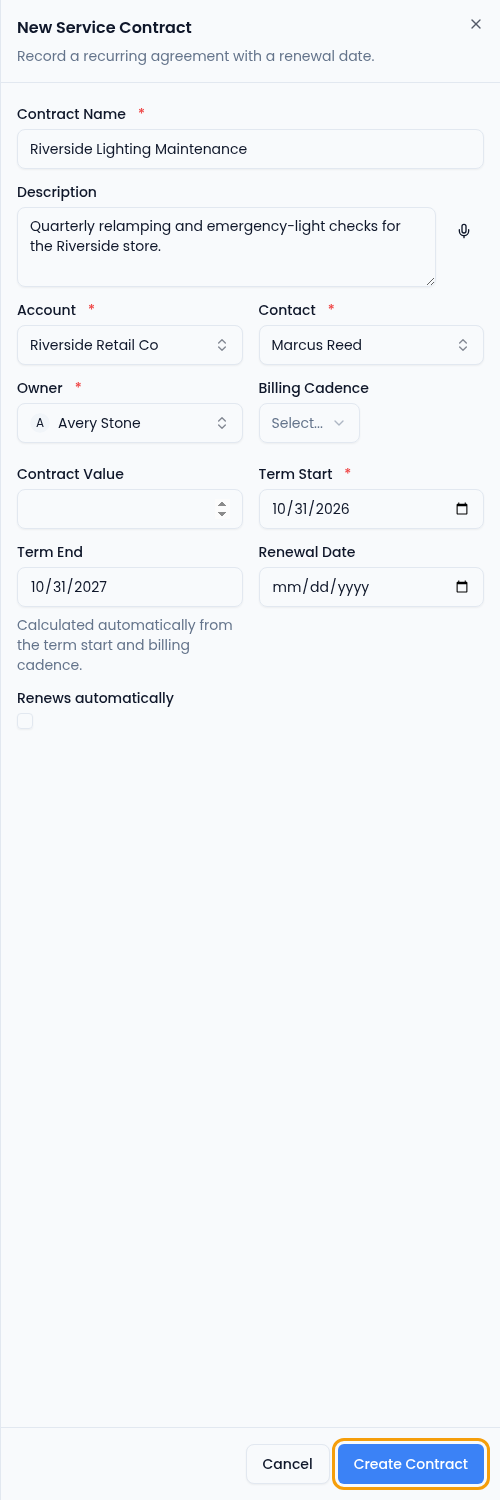
Enter the Contract Name and, if you like, a Description (you can dictate it with the microphone).
-
Choose the Account, then a Contact at that account, and the Owner who looks after the renewal. All three are required. You can create the account or contact from the picker if it isn't in the CRM yet.
Term End follows the term start and billing cadence. -
Choose the Billing Cadence (Monthly, Quarterly, Annual or One-time) and enter the Contract Value if you track one.
-
Enter the Term Start. Term End is filled in for you: one month, three months or a year later, depending on the cadence (for One-time, the same day).
-
Enter the Renewal Date: the date you need to have the renewal settled by. Without one, the contract never shows a renewal flag.
-
Tick Renews automatically if the agreement rolls over on its own.
-
Select Create Contract. New contracts start as Draft.
Work a contract through its term
Open a contract to see its term at a glance.
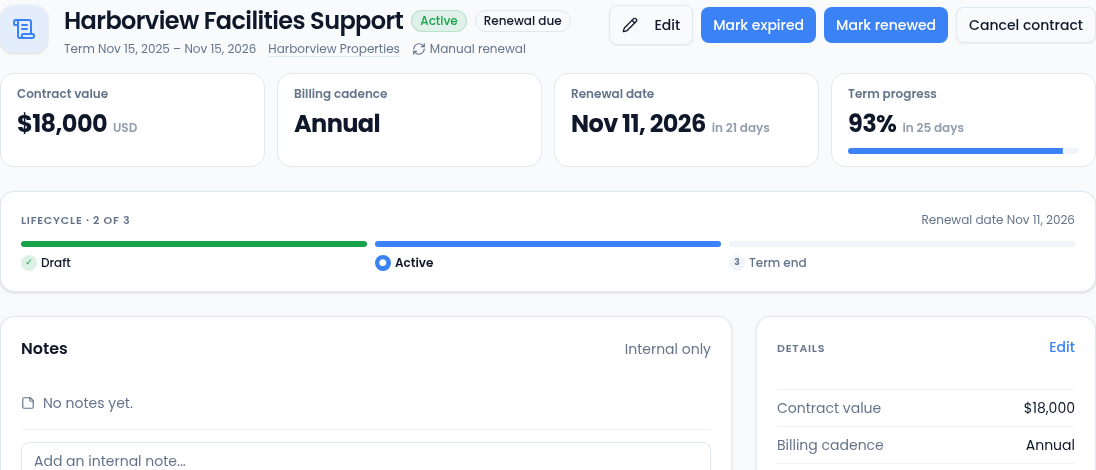
- Activate a draft when the agreement starts. Once it's active, the Term Start can't be changed.
- At the end of the term, select Mark renewed or Mark expired. Cancel contract ends it early, from Draft or Active. All three are final: a renewed, expired or cancelled contract can't change status again.
- Mark renewed only closes this term. Record the next term as a new contract with New Contract, so each term keeps its own dates and value.
- Notes keeps an internal record of the renewal conversation. Only your team sees it.
- Details lists the value, cadence, dates, account, contact and owner, with Edit to change them. Attached documents shows files linked to the contract.
Who can do what
Seeing contracts needs permission to view service contracts. New Contract, Edit and the status buttons appear only for people who can change them.