Turn a form into a help-desk intake
Turn on Service tickets for a conversion page so every submission opens a service request with the customer's answers.
Reviewed AdminVertiqa 1.75+
A conversion page can open a service request for every submission, so a "Report a problem" or "Request a repair" form lands straight in your help-desk queue.
Turn on service tickets
- Open Settings → Conversion Pages and select the page.
- Find Submission routing on the right.
- Switch on Service tickets ("Also open a help-desk ticket from the captured inquiry").
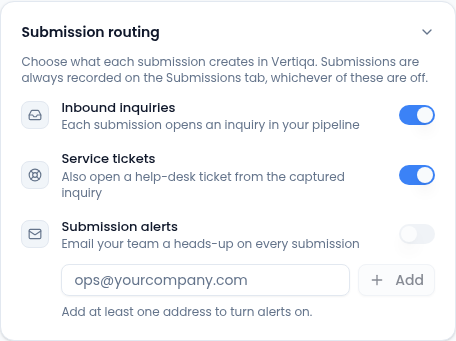
Routing starts once the page is published. Until then the card says Routing activates once the page is published.
What each submission creates
- A service request for the person who submitted, with the form's answers as its description: each question and answer, in the order they appear on the form. Contact details and permission checkboxes aren't repeated there.
- An inbound inquiry too, if Inbound inquiries is also on. With it off, the inquiry is marked Converted to ticket and stays off the inbox queue.
Every submission is also recorded on the page's Submissions tab, whichever of these are on.
Submission alerts is separate: it emails your team a heads-up for every submission. Add an address before you switch it on.
Tips
- Ask what you'll need to resolve the request on the form itself, such as the site, the equipment and how urgent it is, so the request starts complete.
- Check the owner and target date when you pick a request up, so it shows up as overdue if it slips.